How to Switch from Google Gemini to Microsoft Copilot Without Losing Momentum
Discover practical steps to switch from Google Gemini to Microsoft Copilot while maintaining momentum and avoiding productivity gaps.

Short answer: Switching from Google Gemini to Microsoft Copilot requires careful management of workflow continuity and a clear understanding of integration differences. You must anticipate changes in AI interaction models, data handling, and app connectivity to avoid productivity gaps.
This article covers the operational impacts of switching from Google Gemini to Microsoft Copilot, focusing on how to maintain momentum during the transition. It explains key functional differences, integration nuances, practical steps for a smooth switch, common pitfalls, and when to reconsider your move. This guide is for tech leads, product managers, and IT decision makers who need actionable advice rather than feature comparisons.
What are the key functional differences between Google Gemini and Microsoft Copilot?
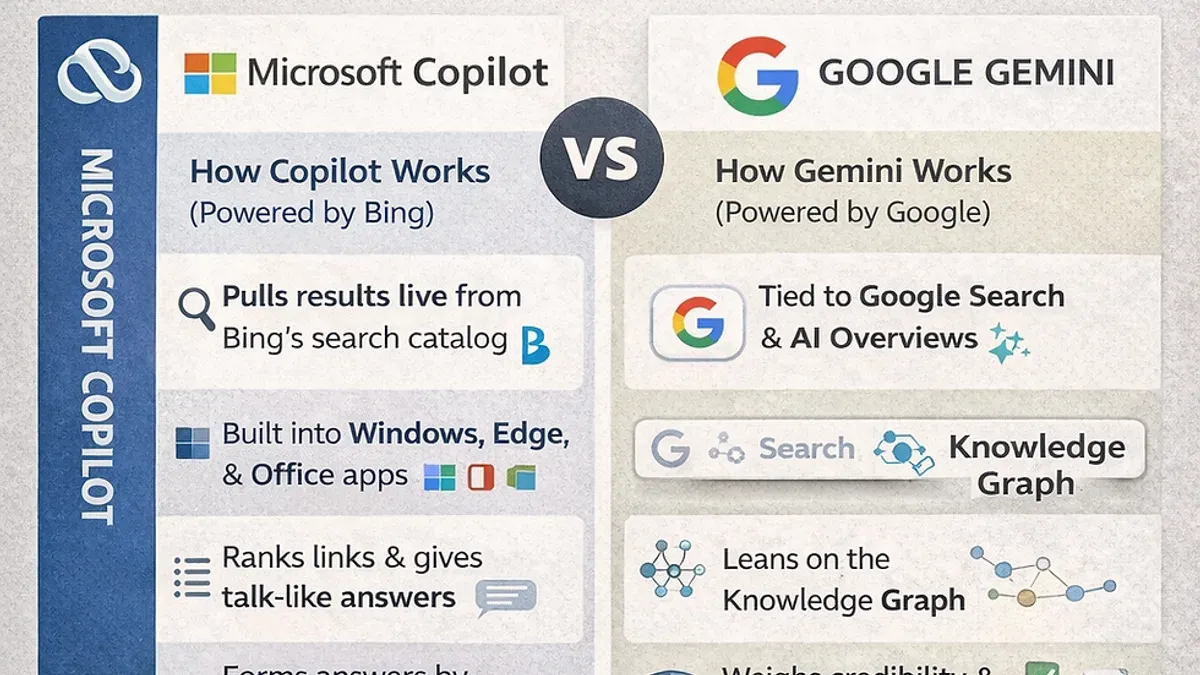
Google Gemini operates as a versatile, generalist AI model designed to support a wide range of tasks across platforms, while Microsoft Copilot is tightly embedded within the Microsoft 365 ecosystem, enhancing apps like Word, Excel, and Teams with context-aware AI assistance. Gemini offers broad, platform-agnostic capabilities, but Copilot’s deep integration enables more seamless workflow automation and real-time collaboration within familiar Microsoft interfaces.
Customization differs significantly. Gemini allows users to adjust AI behavior via API parameters and cloud console settings, giving moderate control over output style and scope. Copilot, however, leverages enterprise-level admin controls accessible through the Microsoft 365 admin center, letting you manage permissions, data access, and AI feature rollout across departments with granular precision.
Data privacy and compliance vary between the two. Gemini’s data handling aligns with Google Cloud’s security standards, which may require additional configuration to meet certain industry regulations. Copilot benefits from Microsoft’s compliance certifications and integrates with existing organizational security policies, making it easier to enforce data governance without complex setup.
| Feature | Google Gemini | Microsoft Copilot |
|---|---|---|
| AI Model Type | Generalist, platform-agnostic | Integrated, Microsoft 365-specific |
| Customization Options | API parameter tuning, cloud console settings | Admin controls via Microsoft 365 admin center |
| Integration Points | Various Google and third-party apps via APIs | Built-in Microsoft 365 apps (Word, Excel, Teams, etc.) |
| User Permission Model | Google Cloud IAM roles and policies | Microsoft 365 role-based access control |
| Data Privacy & Security | Google Cloud security standards, customizable | Microsoft compliance certifications, integrated policies |
For example, if your team relies heavily on Excel for data analysis, Copilot can suggest formulas, automate data transformations, and generate summaries directly within the app. Gemini might require external API calls and separate tools to achieve similar results, adding friction and potential data transfer risks.
Why does switching from Google Gemini to Microsoft Copilot matter for your team's productivity?
Switching to Microsoft Copilot affects more than just the AI technology your team uses; it reshapes how your team collaborates and executes daily tasks. Unlike Google Gemini’s platform-agnostic AI, Copilot is embedded within Microsoft 365 apps, transforming document editing, email management, and presentation workflows directly inside apps like Word, Outlook, and PowerPoint.
For example, a product team moving from Gemini-powered tools to Microsoft apps with Copilot assistance found that automating meeting note summaries and generating project status updates within Teams reduced manual tasks. However, initial disruptions occurred when team members had to adjust to Copilot’s contextual suggestions and the different command structure inside the Microsoft environment.
This switch can improve productivity by streamlining workflows — such as drafting emails with Copilot’s contextual understanding of recent conversations or creating slide decks based on live data in Excel. But it also requires a period of adjustment as users adapt to Copilot’s integration style, which demands new habits for AI interaction directly inside productivity apps rather than a separate AI interface.
How does Microsoft Copilot integrate into existing workflows compared to Google Gemini?
Microsoft Copilot uses the Microsoft Graph API to tap deeply into organizational data across Microsoft 365 apps like Outlook, Teams, and SharePoint. This allows it to provide context-aware AI assistance based on your team's emails, calendars, files, and communication history. In contrast, Google Gemini operates through broader APIs and environments, often requiring separate authentication and less seamless data access.
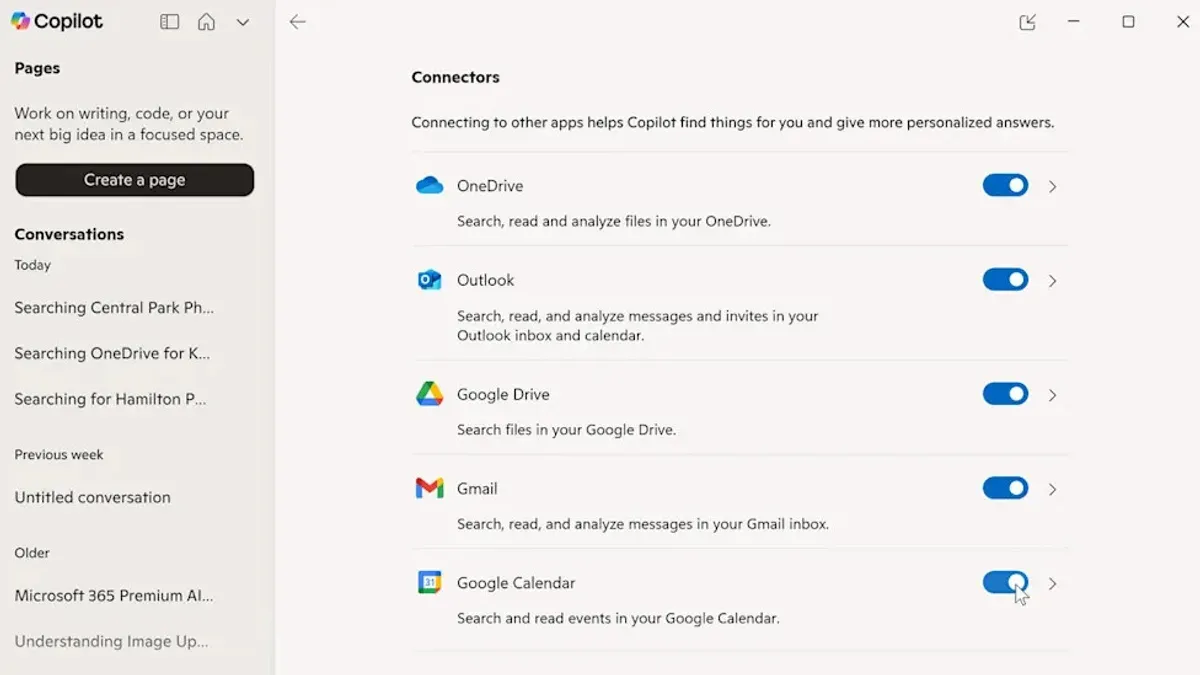
Connecting Copilot to your enterprise Microsoft 365 involves enabling the Copilot feature in the Microsoft 365 admin center, assigning appropriate licenses, and configuring permissions under Azure Active Directory. This setup ensures Copilot respects your compliance and data governance policies while accessing user data.
Data migration and model training when switching can cause bottlenecks. For example, syncing user preferences and historical data into Copilot’s environment can take hours to days depending on your organization's size. Missing steps like granting app permissions or incomplete data syncs often stall the rollout.
Imagine a product manager shifting from Gemini to Copilot: they need to authorize Copilot in the admin portal, verify group policy settings, and allow time for document indexing. Failure to do so means Copilot won’t deliver personalized suggestions or integrate fully into Teams chats, impacting day-to-day productivity.
- Enable Copilot in the Microsoft 365 admin center (expect 10-30 minutes)
- Assign Copilot licenses to users
- Configure Azure AD permissions for app access
- Sync user data and documents (may take hours to days)
- Verify group policies and compliance settings
- Test AI suggestions in core apps before full rollout
What practical steps should you take to switch smoothly from Google Gemini to Microsoft Copilot?
Start by auditing your current Google Gemini use cases and data dependencies. Identify which workflows rely heavily on Gemini’s APIs and document data sources, integration points, and user groups. This assessment typically takes one to two weeks and requires collaboration between IT and product teams.
Next, set up pilot groups within Microsoft 365 to test Copilot features in real-world scenarios. Select representatives from different departments to uncover integration gaps and user experience issues early. Use Microsoft 365 admin center to configure Copilot access, focusing on Microsoft Graph API permissions and compliance settings. Pilot testing should run for at least two weeks.
Train your staff on Copilot’s interface and capabilities. This includes hands-on sessions covering the Microsoft 365 ribbon integration, prompt options in apps like Word and Excel, and admin portal controls. Avoid assuming familiarity; Copilot’s interaction model differs from Gemini’s broad API approach, so emphasize practical exercises and troubleshooting.
Finally, create fallback plans and support channels during the transition. Maintain parallel access to Google Gemini where possible for critical tasks. Establish a dedicated helpdesk with clear escalation paths to resolve issues quickly. Communicate timelines and expectations to minimize disruption.
- Audit Gemini workflows and data dependencies (1–2 weeks)
- Configure Microsoft 365 pilot groups and run tests (2 weeks)
- Conduct targeted training on Copilot features and admin setup
- Develop fallback plans and dedicated support channels
- Maintain parallel Gemini access during initial transition
Which common mistakes do teams make when switching from Google Gemini to Microsoft Copilot?
Underestimating the complexity of integrating Microsoft Copilot into your existing systems is a frequent error. Teams often skip comprehensive testing phases, leading to unexpected disruptions. For example, a firm that moved quickly without validating Microsoft Graph API permissions faced data sync failures, causing delays in report generation and user frustration.
Another common pitfall is neglecting to tailor AI outputs to your specific business processes. Copilot’s responses must be aligned with your workflows; otherwise, the AI generates irrelevant or incomplete suggestions, which can reduce productivity and trust. A sales team that failed to customize templates found Copilot’s generated emails required extensive manual edits.
Insufficient user training is a critical mistake. Users unfamiliar with Copilot’s interface and command structures struggle to leverage its capabilities effectively, leading to resistance and errors. Providing hands-on sessions focused on new workflows prevents this decline in adoption.
Finally, ignoring security permissions and compliance during migration risks data exposure or policy violations. Overlooking the need to configure Microsoft 365 compliance boundaries or role-based access controls can lead to unauthorized data access, creating serious risks.
- Do a thorough integration test including API permissions
- Customize AI outputs to fit your workflows
- Deliver targeted user training on Copilot interfaces
- Review and configure security settings and compliance roles
When should you reconsider switching: limits and risks of moving from Gemini to Copilot
If your organization relies heavily on non-Microsoft ecosystems like AWS, Salesforce, or Slack, switching entirely to Microsoft Copilot may disrupt established workflows. Copilot’s deep integration favors Microsoft 365 environments, which can lead to fragmented processes or duplicated effort when bridging with external platforms. For example, a product team using Salesforce for CRM and Slack for communication found that Copilot’s AI assistance was limited outside Outlook and Teams, reducing its practical value.
Customization needs that surpass Copilot’s current capabilities are another reason to pause. If your workflows require AI models to handle specialized data formats or custom APIs beyond Microsoft Graph, Google Gemini’s broader API approach might better suit you. A tech lead attempting to integrate AI into a bespoke analytics dashboard discovered that Copilot’s granular controls could not accommodate their unique data processing, forcing them to maintain Gemini alongside Copilot.
Vendor lock-in and long-term costs also warrant caution. Relying exclusively on Microsoft Copilot ties your AI capabilities deeply into the Microsoft ecosystem, which may limit flexibility and increase expenses over time. Organizations with hybrid cloud strategies often find a mixed approach more sustainable, keeping Gemini for cross-platform tasks while using Copilot within Microsoft 365.
- Assess your core platforms and cross-application needs before switching.
- Evaluate if Copilot’s customization options meet your specific workflow demands.
- Consider hybrid models to avoid vendor lock-in and maintain flexibility.
Frequently asked questions
Can I run Google Gemini and Microsoft Copilot side-by-side during transition?
Yes, you can run both platforms side-by-side to reduce disruption. However, managing two AI tools simultaneously requires extra coordination to avoid duplicated work or conflicting outputs. Use clear guidelines for which tasks each platform handles during the overlap period and monitor integration points carefully.
What are the data privacy implications when switching platforms?
Switching from Google Gemini to Microsoft Copilot involves re-evaluating your data handling policies. Microsoft Copilot operates within the Microsoft 365 compliance framework, so ensure your data migration adheres to your organization’s privacy standards. Check the settings in Microsoft Purview and Azure Active Directory to maintain control over data access and permissions.
How long does it typically take to complete a full switch?
The duration of a full switch varies by organization size and complexity but generally ranges from a few weeks to a couple of months. Time is needed to migrate data, retrain staff on new workflows, and integrate Copilot into existing tools. Planning phased rollouts and pilot testing can help avoid delays.
Are there any hidden costs involved in moving to Microsoft Copilot?
Beyond licensing fees, hidden costs can include training sessions, workflow redesign, and potential downtime during migration. You may also incur expenses from upgrading infrastructure to support Microsoft Copilot’s integration requirements. Budget for these operational costs when planning your switch.
Quick checklist
- Map out all current Google Gemini integrations and identify equivalent Microsoft Copilot connectors in Microsoft 365 admin center.
- Train your team on Microsoft Copilot’s prompt interfaces within Office apps and Teams to minimize downtime.
- Set up data migration with a focus on preserving metadata and context where possible to maintain workflow continuity.
- Adjust automation scripts and API calls to align with Microsoft Graph API endpoints used by Copilot.
- Schedule a phased rollout with feedback loops to catch and resolve integration issues early.
What this guide does not cover and when to seek specialized help
This guide focuses on productivity and technical considerations for switching AI tools at the workflow level. It does not address legal compliance, data privacy regulations, or licensing negotiations, which require dedicated legal and procurement expertise. If your organization handles sensitive data or operates under strict regulatory regimes, consult your compliance officer or legal team before proceeding. Complex enterprise contracts with Google or Microsoft should be reviewed by legal counsel to avoid unexpected costs or restrictions.
Switching AI assistants impacts daily work patterns. The single most useful next step is to run a controlled pilot with a focused team segment. This lets you evaluate operational impacts firsthand, refine your migration approach, and avoid broad disruptions. Start with high-value workflows that rely on deep integration to surface gaps early. Document lessons and adjust training accordingly to maintain momentum during your full transition.
See also: Switching from Google Gemini to MagicSchool AI: A Practical Guide · Switching from ChatGPT to Microsoft Copilot: What You Need to Know