How to Roll Out ChatGPT for Older Employees Effectively
Discover essential steps to introduce ChatGPT to older employees with tailored training, clear communication, and ongoing support for smooth adoption.

Short answer: A successful ChatGPT rollout plan for older employees requires clear communication, tailored training sessions, and ongoing support that addresses their unique learning pace and tech comfort. Focus on practical demonstrations, simple explanations, and creating a safe space for questions to encourage adoption.
This article covers the essential steps to introduce ChatGPT to older employees effectively, balancing technology challenges with business goals. You will learn how to structure training, choose the right tools, avoid common pitfalls, and ensure your team gains confidence in using ChatGPT for daily tasks. The guidance is designed for HR managers, team leaders, and decision-makers tasked with managing this transition.
What are the plans for ChatGPT?
ChatGPT offers three main plans: Free, Plus, and Business. The Free plan provides access to the basic GPT-4 model with standard speed and capacity limits. It suits individual users exploring ChatGPT without heavy usage needs.
The Plus plan costs a monthly fee and grants faster response times, priority access during peak hours, and early access to new features. This plan fits users who rely on ChatGPT regularly and want smoother performance.
The Business plan targets organizational use. It includes all Plus features plus enhanced security, admin controls, API access for integration, and collaboration tools for teams. This plan supports business workflows and compliance requirements.
For example, a team leader introducing ChatGPT to older employees might choose the Business plan to ensure data privacy and manage user access centrally. In contrast, an individual employee experimenting with ChatGPT could start with the Free or Plus plan depending on usage intensity.
| Plan | Access Speed | Capacity | API Access | Collaboration | User Profile |
|---|---|---|---|---|---|
| Free | Standard | Limited | No | No | Individual, light use |
| Plus | Faster | Higher | No | No | Individual, regular use |
| Business | Fastest | High | Yes | Yes | Organizations, teams |
Is there a yearly plan for ChatGPT?
Yes, ChatGPT offers annual billing options for some of its paid plans, including ChatGPT Plus and certain business subscriptions. Choosing a yearly plan typically requires a single upfront payment that covers 12 months of service, often providing a cost advantage compared to paying month-to-month.
For example, ChatGPT Plus is commonly priced at $20 per month if billed monthly. With annual billing, you might pay the equivalent of 10 months instead of 12, effectively saving around 15-20%. This discount rewards commitment but requires budgeting for a larger upfront expense.
For organizations, an annual plan simplifies forecasting and budget allocation by locking in costs for the year. It reduces the administrative overhead of monthly payments and can improve cost control. However, it also means less flexibility if your needs change, since you’re committed for a full year.
Consider your company’s cash flow and expected usage before choosing. Monthly plans offer flexibility, while annual plans provide savings and budgeting predictability.
- Check if your selected plan supports annual billing in the subscription settings.
- Compare total annual cost versus monthly payments over 12 months.
- Factor in budget cycles and payment approvals for upfront annual fees.
- Decide based on expected usage stability and financial preference.
How to upgrade ChatGPT plan?
Start by logging into the ChatGPT account on chat.openai.com. Locate the profile icon on the bottom left and click it to open the menu. Select Settings, then navigate to the Subscription tab. Here, you will find options to upgrade from the free plan to a paid plan like ChatGPT Plus. Choose the plan that fits your team’s needs.
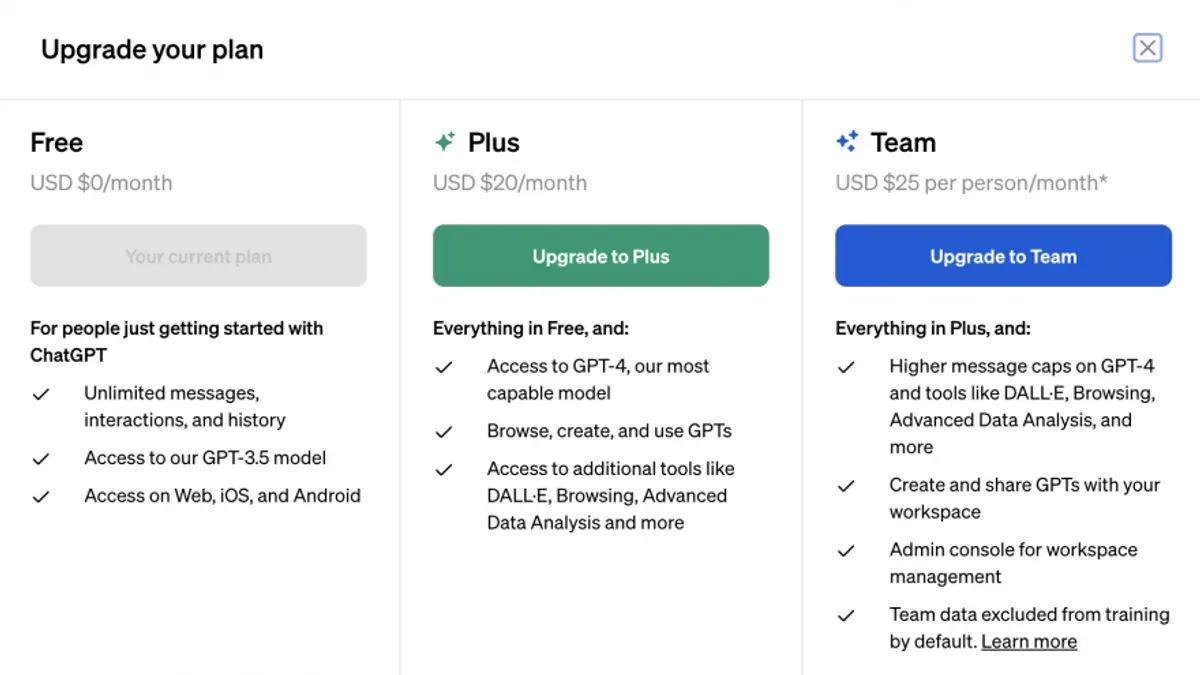
For older employees unfamiliar with digital subscriptions, guide them clearly through each step. Explain that after selecting a plan, they must enter payment details—usually credit or debit card information—on a secure payment page. Highlight the importance of confirming the purchase by clicking the Subscribe button. Remind them to check their email for a confirmation message.
Account management tips include saving login credentials securely and bookmarking the account settings page for easy future access. If billing or subscription questions arise, direct users to the Help & Support link in the settings menu, which includes FAQs and a way to contact support. An example FAQ might be: "How do I update my payment method?" with step-by-step instructions.
Picture this: an HR manager helps a senior team member upgrade by walking them through Settings > Subscription, selecting ChatGPT Plus, entering card info, and confirming. Then, they show the employee how to access support if needed. This hands-on approach reduces anxiety and technical errors.
- Log in and open Settings via the profile icon
- Select Subscription and choose the desired plan
- Enter payment information carefully
- Confirm subscription and check email for confirmation
- Bookmark account settings for easy future management
- Use Help & Support for billing or technical questions
Do employers care if you use ChatGPT?
Many employers actively encourage the use of AI tools like ChatGPT to boost efficiency and support decision-making. Official workplace policies often specify approved AI applications, outlining acceptable use to ensure data security and compliance. For example, a company might allow ChatGPT for drafting emails but restrict sharing confidential information within the prompts.
Employers value ChatGPT because it speeds up routine tasks, reduces errors, and helps employees focus on higher-level work. HR professionals commonly report a positive shift in productivity when AI tools are integrated thoughtfully. However, older employees may worry that using ChatGPT signals a lack of skill or threatens job security, which is usually unfounded.
Consider a team leader who noticed older staff hesitant to try ChatGPT. After demonstrating how it drafts standard reports quickly, the team adopted it, improving output without compromising quality. Clear communication about AI’s role and respecting privacy builds trust and eases adoption.
What are the different ChatGPT plans?
ChatGPT offers plans designed to meet the needs of business and government users, focusing on scheduling, planning, and compliance. The Business plan enables integration with workplace software like Microsoft Teams and Slack, allowing seamless chatbot access within familiar tools. It supports employee scheduling by generating shift plans and automating routine requests, reducing manual workload.
Government and enterprise plans add layers of security and compliance, including data encryption, audit logs, and role-based access controls. These are essential for handling sensitive information and adhering to regulations. Collaboration features enable users to share prompts, responses, and workflows securely across teams.
For example, a local government office used the enterprise plan to automate public service scheduling and document drafting. This reduced administrative delays and ensured compliance with data handling rules. The integration with existing scheduling software meant employees accessed ChatGPT capabilities without switching apps.
- Choose a plan based on required integrations and security needs
- Set up role-based permissions for sensitive data
- Use collaboration tools to share workflows safely
- Test scheduling features in a pilot group before full rollout
How to use ChatGPT for retirement and employee scheduling planning?
ChatGPT can simplify retirement planning by generating clear, step-by-step financial summaries and timelines. For example, you can prompt it with: "Create a retirement plan outline for an employee aged 60 with 10 years until retirement, including savings milestones and benefit options." The output will break down complex data into manageable actions, making it easier for older employees to understand and prepare.
For employee scheduling, ChatGPT can optimize shift assignments by balancing workload and preferences. Use prompts like: "Generate a weekly schedule for 10 employees with varying availability, ensuring fair shift distribution and coverage during peak hours." This reduces manual errors and saves hours of administrative work. The AI can quickly adjust schedules based on updated availability or unexpected absences.
Before using ChatGPT, managers often spent several hours compiling schedules or retirement summaries. After introducing AI assistance, these tasks typically take a fraction of the time, freeing staff to focus on higher-value activities. The AI acts as an assistant, not a replacement, enabling smoother, faster planning.
- Use specific, detailed prompts for retirement and scheduling tasks.
- Review AI-generated outputs for accuracy and relevance.
- Adjust prompts to refine results as needed.
- Incorporate AI-assisted summaries into employee meetings or planning sessions.
- Train older employees on interacting with ChatGPT effectively.
What mistakes to avoid when rolling out ChatGPT to older employees?
Assuming all older employees have similar tech skills leads to ineffective training and frustration. Tailor sessions to individual comfort levels with technology, offering hands-on demonstrations and plenty of time for questions. For example, a company that launched group training without assessing skill levels saw many employees disengage and later request one-on-one support.
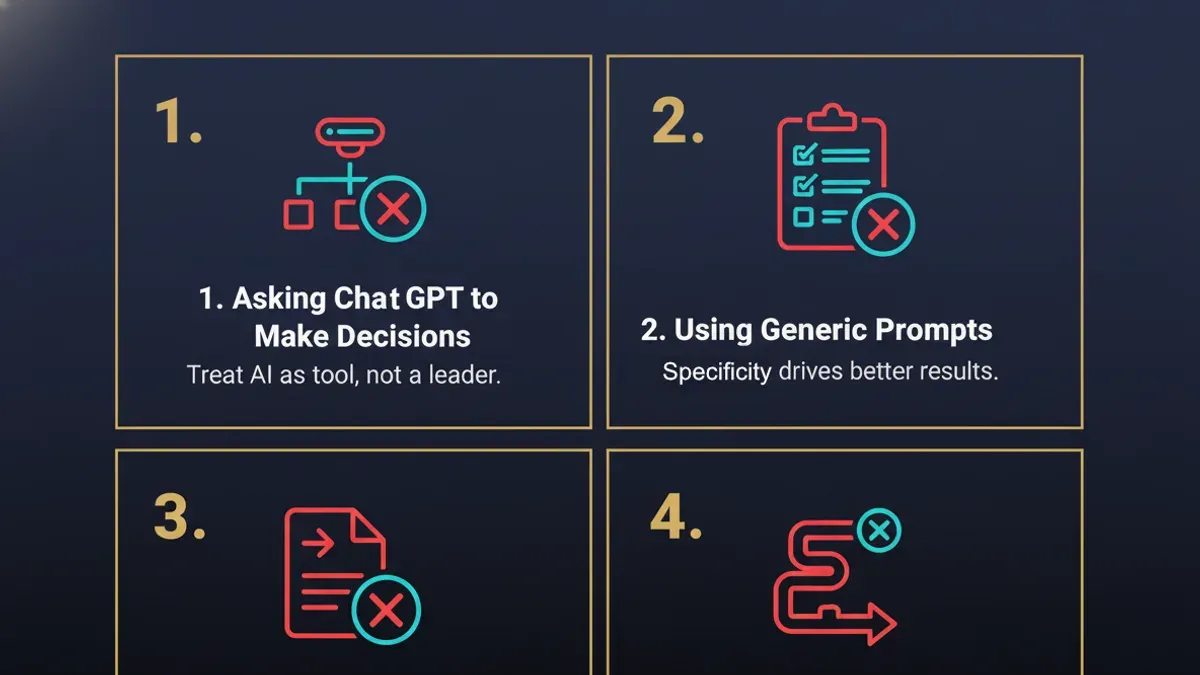
Ignoring privacy and data security concerns can stall adoption. Older employees often worry about how their data is used. Address these concerns upfront by clearly explaining ChatGPT’s data policies and company safeguards. Transparency reduces resistance and builds trust.
Failing to communicate ChatGPT’s role and limitations causes unrealistic expectations. Clarify that ChatGPT assists but does not replace human judgment. One organization faced backlash when employees expected the AI to solve every problem, leading to disappointment and decreased use.
- Assess tech skills individually before training
- Provide clear, hands-on, paced training sessions
- Explain data privacy and security measures in detail
- Set realistic expectations about ChatGPT’s capabilities
- Maintain open channels for ongoing questions and feedback
Frequently asked questions
Does chatgpt have an annual plan?
ChatGPT offers subscription options, but an explicit annual plan is not always listed as a separate option. Typically, users subscribe monthly under ChatGPT Plus, with billing recurring each month. Some platforms or resellers may offer annual payment options, but these are not standard in the official OpenAI interface.
Does ChatGPT have an annual plan?
The official OpenAI ChatGPT subscription primarily runs on a monthly billing cycle under ChatGPT Plus. Users can check their account settings for any available billing options. Annual payment plans are uncommon and usually not promoted directly through the main ChatGPT subscription service.
How do I upgrade my ChatGPT plan?
To upgrade, log into your OpenAI account and navigate to the subscription or billing section. From there, select ChatGPT Plus or any higher-tier option available, then follow prompts to enter payment details. The upgrade takes effect immediately after confirmation, allowing access to enhanced features.
Do employers care if employees use ChatGPT at work?
Employers' attitudes toward ChatGPT use vary depending on company policy and industry regulations. Some encourage it for productivity gains, while others restrict use due to data privacy or compliance concerns. Always verify with your organization's IT and HR departments before using ChatGPT for work tasks.
What are the different ChatGPT plans available?
ChatGPT mainly offers a free tier with basic access and ChatGPT Plus, which provides faster response times and priority access during peak hours. Beyond these, OpenAI offers API access plans for businesses with usage-based pricing. Specific enterprise or customized plans may be available upon direct inquiry with OpenAI sales.
Quick checklist
- Clarify your organization's ChatGPT subscription plan and upgrade options in the admin console.
- Design training sessions that address common tech anxieties and use step-by-step demonstrations.
- Communicate clear usage policies to address employer concerns about ChatGPT use.
- Show how ChatGPT can help with retirement planning and employee scheduling through real examples.
- Avoid rushing rollout; allow older employees time for gradual adoption and repeated practice.
- Provide ongoing access to support resources and encourage peer mentoring.
What this advice does not cover
This advice does not cover technical IT infrastructure setup or advanced AI integration beyond ChatGPT subscription and user adoption. Older employees with significant digital literacy challenges may require additional personalized support beyond general rollout plans. For complex system integrations, consult your IT department or AI specialists.
Focus on the single next step: start by selecting the right ChatGPT plan that matches your team’s needs, then schedule targeted, hands-on training sessions that allow older employees to practice in a low-pressure environment. This ensures smoother adoption and sets the foundation for productive ChatGPT use.
See also: ChatGPT Implementation Timeline: How It Evolved and What You Need to Know