How to Create an Effective Formative Implementation Timeline
Discover how to build a flexible formative implementation timeline that tracks milestones and keeps your project on track.

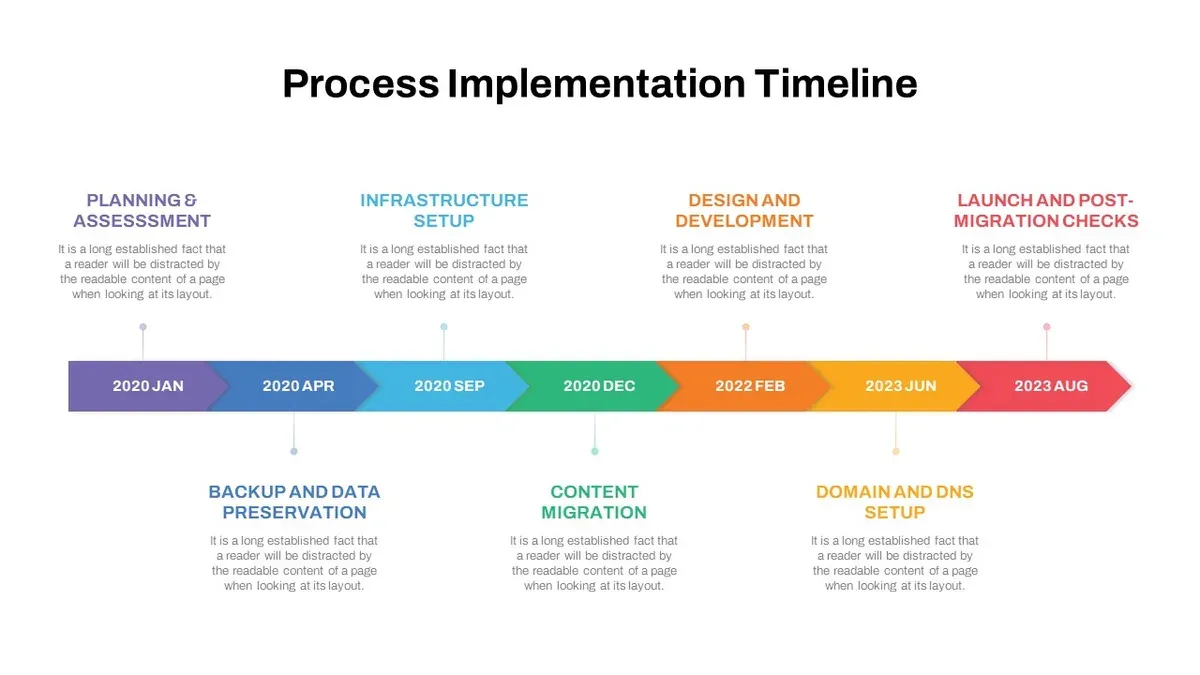
Short answer: A formative implementation timeline is a detailed schedule that maps out each step of your project's rollout, emphasizing adaptability and milestone tracking. It helps you organize tasks, allocate resources, and maintain accountability throughout the implementation phase.
This article covers how to create a formative implementation timeline tailored to your project's needs. You will learn the difference between a timeline and a time frame, how to build milestone-driven schedules that remain flexible, the best formats for presenting your timeline, and common pitfalls to avoid. The goal is to equip you with clear, actionable strategies to plan and execute your formative implementation process confidently and effectively.
What is a formative implementation timeline and why does it matter?
A formative implementation timeline is a structured schedule that tracks key actions and milestones throughout a project or change rollout. It breaks down the process into manageable phases, allowing you to monitor progress, allocate resources effectively, and adjust plans as obstacles or new information arise. This timeline acts as a roadmap that keeps everyone aligned and accountable.
For example, imagine launching a new software system. The timeline would detail stages like requirements gathering, development, testing, training, and deployment, with clear deadlines and responsible parties. This clarity helps you spot delays early and reassign resources before issues escalate.
Projects using clear timelines often see smoother execution and higher success rates because stakeholders communicate openly and know what to expect. Without a timeline, tasks can slip through the cracks, resource bottlenecks go unnoticed, and accountability blurs, increasing the risk of failure or costly delays.
How to create an implementation timeline that works for your project?
Start by clearly defining your project scope, objectives, and key deliverables. For example, if you're launching a new software feature, list all required components like design, coding, testing, and deployment. Next, identify and sequence tasks logically; design must finish before coding begins. Assign realistic durations to each task based on team capacity and past experience. For instance, allocate two weeks for design, three weeks for coding, and one week for testing. Include dependencies so tasks start only when prerequisites finish.
Incorporate buffer times to accommodate delays. Without buffers, a two-week testing phase delayed by three days pushes the entire timeline back. Adding a 20% time buffer absorbs such setbacks, keeping the project on track without panic. Choose tools that suit your team’s workflow. Spreadsheet templates work for small teams; tools like Microsoft Project or Asana handle complex dependencies and automatic updates.
Consider this example: a marketing campaign rollout scheduled over eight weeks. Without buffers, delays in content creation cascade into missed launch dates. Adding a 10-day buffer spread across key tasks reduces pressure and improves deadline adherence.
- Define scope, objectives, and deliverables
- List and sequence tasks with dependencies
- Assign realistic durations
- Add buffer time for delays
- Use tools matching your team’s workflow
What are the best timeline formats to use in a presentation?
Choosing the right timeline format depends on your audience and the project complexity. Gantt charts are ideal for detailed project schedules, showing task durations and dependencies. They work well in Excel or Microsoft Project but can overwhelm non-technical stakeholders if too dense. Milestone charts focus on key deadlines and deliverables, making them perfect for executive summaries or status updates. These can be created easily in PowerPoint using shapes and icons.
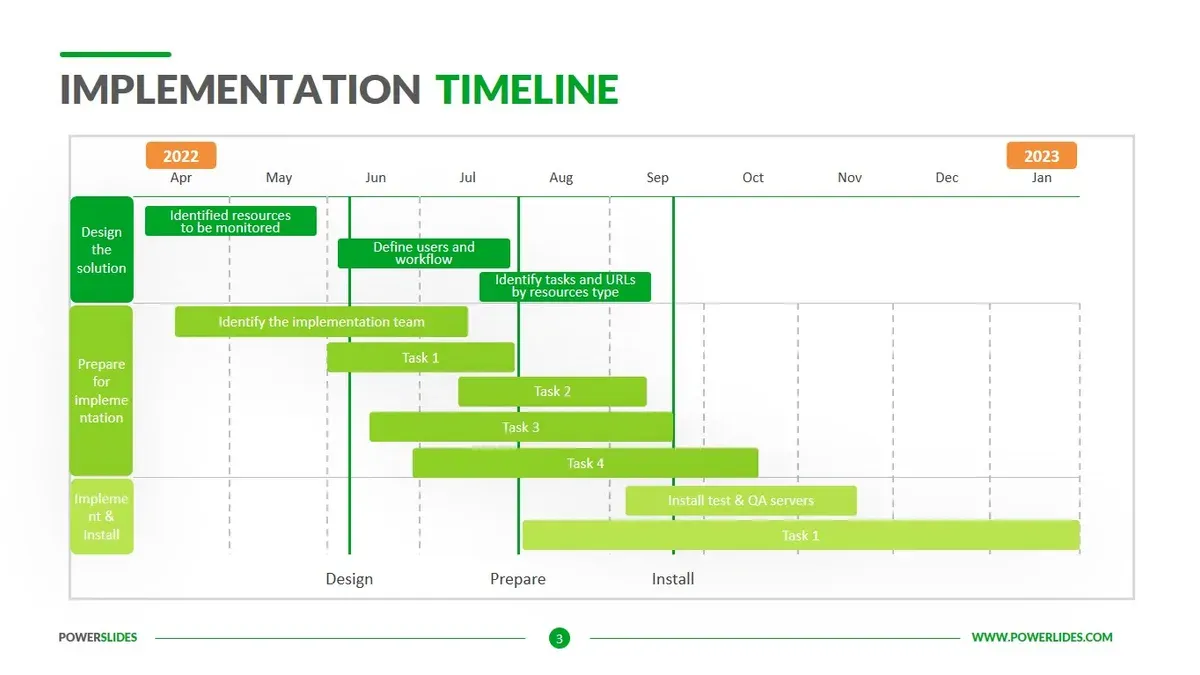
Linear timelines present events sequentially along a horizontal or vertical line. They offer clarity for simple projects or phases and are highly customizable in PowerPoint templates. However, they lack detail on task overlaps or durations. PowerPoint’s built-in timeline templates, such as the "Basic Timeline" found under Insert > SmartArt > Process, provide a starting point that you can tailor by adding milestone markers and color-coded phases for emphasis.
When integrating visuals in presentations, keep them uncluttered. Highlight critical milestones with bold colors or icons. Use consistent fonts and alignments to improve readability. Avoid overloading slides; consider breaking complex timelines into multiple views or zooming into phases. For example, a Gantt chart can be split into quarter-specific slides to maintain focus without losing detail.
- Match format to audience needs: detailed Gantt for teams, milestone charts for executives
- Customize PowerPoint SmartArt by adding colors and icons to highlight phases
- Break complex timelines into segments to avoid clutter
- Use consistent styles and clear labels for readability and easy updates
How do you build a timeline for change implementation?
Start by dividing the change process into four clear phases: preparation, rollout, stabilization, and evaluation. In the preparation phase, assign tasks like stakeholder analysis and communication planning, involving key leaders and department heads. During rollout, schedule training sessions and the initial deployment of new processes, keeping frontline teams actively engaged. The stabilization phase focuses on monitoring adoption, troubleshooting issues, and reinforcing new behaviors through regular check-ins. Finally, evaluation measures impact via surveys or performance metrics, with feedback loops informing adjustments.
For example, a mid-sized company implementing a new customer relationship management system set milestones such as completing staff training by week four, achieving 70% user adoption by week eight, and resolving 90% of reported issues by week twelve. Stakeholder checkpoints occurred after each phase to confirm readiness and address concerns. They maintained flexibility by allowing extensions in rollout if adoption lagged, ensuring the timeline adapted to real-world feedback.
This structured, milestone-driven approach helps you track progress, engage stakeholders appropriately, and adjust plans as necessary to secure change success.
- Define clear change phases and associated activities
- Map stakeholder roles and involvement per phase
- Set measurable milestones for adoption and impact
- Build flexibility to revise the timeline based on feedback
How do you create an implementation plan and timeline with milestones?
Start by developing a detailed implementation plan that lists all tasks, assigns clear responsibilities, and allocates resources. For example, in a software rollout, tasks include requirements gathering (assigned to the business analyst), development (software engineers), and user training (training coordinator). Each task should have a defined output and deadline.
Translate these tasks into timeline entries, marking key milestones such as completion of requirements, prototype approval, and final user sign-off. Milestones act as checkpoints for critical approvals or deliverables, signaling when to move to the next phase or adjust plans.
For instance, your timeline might show a milestone on "Prototype Approval" at week 6 after design and development tasks. This milestone triggers the start of user acceptance testing.
Regularly review and update your timeline to reflect actual progress, shifting resources or deadlines as needed. This keeps the timeline actionable and aligned with project realities.
| Implementation Plan Excerpt | Timeline Segment with Milestones |
|---|---|
| Task: Requirements Gathering Owner: Business Analyst Output: Requirements Document Deadline: Week 2 | Milestone: Requirements Document Complete When: End of Week 2 |
| Task: Prototype Development Owner: Software Engineers Output: Prototype Deadline: Week 6 | Milestone: Prototype Approval When: Week 6 |
| Task: User Training Owner: Training Coordinator Output: Training Sessions Delivered Deadline: Week 8 | Milestone: User Training Complete When: Week 8 |
- Develop a plan outlining tasks, owners, outputs, and deadlines
- Map each task to timeline entries with clear milestone markers
- Use milestones as critical checkpoints for approvals and deliverables
- Review and update the timeline regularly to stay aligned with progress
What is the difference between a time frame and a timeline?
A time frame is the total duration allocated to complete a project or a specific phase within it. It sets the boundaries for when work starts and ends but does not specify how tasks fit within that span. A timeline, by contrast, is a detailed schedule that sequences tasks and milestones with specific start and end dates. It visually maps out the order and duration of activities within the time frame.
Both elements are essential. The time frame provides the overall deadline and scope, while the timeline organizes the workflow to meet that deadline. Without a clear time frame, the timeline lacks context. Without a timeline, the time frame is just a vague deadline.
For example, if you have a six-month time frame to implement a new software system, the timeline breaks down that period into phases like requirements gathering, development, testing, and deployment, each with assigned dates and milestones. This clarity helps you track progress and adjust resources effectively.
| Aspect | Time Frame | Timeline |
|---|---|---|
| Definition | Total duration allocated for project or phase | Detailed schedule of tasks and milestones within the time frame |
| Purpose | Sets overall start and end boundaries | Organizes sequence and timing of work |
| Detail Level | Broad, high-level | Specific and granular |
| Use | Defines scope and limits | Manages execution day-to-day |
| Example | 6 months allocated for software implementation | Gantt chart showing phases and milestones over 6 months |
What mistakes should you avoid when creating an implementation timeline?
Overloading your timeline with too many tasks or excessive detail clutters the view and hinders focus. For example, a project team once tracked hundreds of daily actions on a single timeline, making it impossible to identify critical milestones, which delayed decision-making. Avoid this by grouping tasks into meaningful phases or milestones.
Neglecting to involve key stakeholders during timeline creation leads to gaps and misaligned expectations. One software rollout failed because the IT department’s input was omitted; the timeline lacked necessary testing phases, causing last-minute fixes and missed deadlines. Engage all relevant parties early to ensure comprehensive coverage.
Setting unrealistic deadlines without buffers backfires. A marketing campaign rushed through content development with no contingency, resulting in missed launch dates. Build in contingency time to absorb unforeseen delays.
Treating the timeline as fixed prevents necessary adjustments. Projects evolve; a rigid timeline ignores changing priorities. Incorporate flexibility to revise milestones as conditions shift.
Unclear milestone definitions reduce accountability. If milestones lack specific criteria, teams cannot measure progress effectively. Define milestones precisely, with clear deliverables and review points to maintain ownership and transparency.
- Limit tasks on the timeline to key phases and milestones.
- Include all stakeholders in timeline development.
- Set realistic deadlines with contingency buffers.
- Allow timeline flexibility for adjustments.
- Define milestones clearly with measurable outcomes.
Frequently asked questions
What is an implementation timeline template PowerPoint?
An implementation timeline template in PowerPoint is a pre-designed slide or set of slides that visually organizes key project milestones and deadlines. It enables you to quickly customize dates, tasks, and phases using PowerPoint’s shapes and text boxes. This template helps streamline the presentation of your timeline to stakeholders with clear, editable visuals.
How do I format a timeline of events?
Format your timeline by listing events chronologically along a horizontal or vertical axis. Use consistent spacing and labels to indicate when each event occurs. Highlight milestones with symbols or colors, and keep descriptions brief but informative. Balance readability with detail by avoiding overcrowding and grouping related events where possible.
What is a version 9 implementation timeline?
A version 9 implementation timeline typically refers to the schedule detailing rollout phases for the ninth iteration of a product, software, or process. It outlines key tasks, testing, deployment, and feedback periods specific to version 9. This timeline ensures all teams align on deadlines and dependencies unique to that version’s implementation.
How do I create a timeline for an implementation plan?
Start by identifying all critical milestones and deliverables in your plan. Assign realistic deadlines to each, considering resource availability and dependencies. Use a visual format—such as a Gantt chart or milestone chart—to map tasks over time. Regularly update the timeline to reflect progress and adjust as needed to maintain accountability.
What this advice does not cover
This guide focuses on formative implementation timelines for typical projects and change initiatives. Highly specialized or regulated industries, such as aerospace, pharmaceuticals, or finance, may require tailored approaches beyond this advice, including compliance-specific scheduling tools and risk management frameworks. If your project involves complex legal or technical constraints, consult a subject matter expert or dedicated project management professional familiar with those requirements.
Quick checklist
- Define clear milestones aligned with key project goals.
- Distinguish between overall time frame and detailed timeline elements.
- Choose a timeline format that suits your audience and presentation context.
- Build flexibility into your timeline to accommodate unexpected changes.
- Include accountability measures to track progress against milestones.
- Avoid overly optimistic deadlines and vague task descriptions.
Start by mapping out your project’s critical milestones and deadlines on a shared visual timeline. Use tools like Gantt charts or Kanban boards to ensure transparency and accountability. Regularly update this timeline with your team to maintain momentum and adjust plans as needed. This approach keeps your implementation process clear, actionable, and results-driven.
See also: Edpuzzle Implementation Timeline: A Step-by-Step Guide for Educators · How to Create and Use a Mosyle Implementation Timeline Effectively · Jamf School Implementation Timeline: A Clear Guide for IT Admins · Switching from Edpuzzle to Formative: A Practical Explainer