Moving from Quizlet to Edpuzzle: Your Complete Checklist Guide
This checklist guides you through moving from Quizlet to Edpuzzle, ensuring engaging lessons and smooth content transition.

Short answer: Moving from Quizlet to Edpuzzle involves more than just transferring content; it requires reshaping your teaching approach to leverage interactive videos and embedded questions. This moving from Quizlet to Edpuzzle checklist guides you through preparing your Quizlet sets, creating engaging Edpuzzle lessons, and ensuring a smooth transition that enhances student engagement and tracking.
This article covers the practical steps to adapt your existing Quizlet materials for Edpuzzle’s video-based format, how to embed questions effectively, and strategies to avoid common pitfalls. You’ll also find answers to frequent concerns like Edpuzzle’s pricing and usage limits, along with a detailed rollout checklist to help you implement the switch confidently and efficiently.
Understand why Edpuzzle matters for your teaching goals
Quizlet excels in flashcard and quiz-based study, focusing on memorization and recall through repetition. In contrast, Edpuzzle transforms video content into an active learning experience by embedding questions directly within videos, requiring students to engage continuously as they watch.
Edpuzzle’s interactive video format supports formative assessment by allowing you to track student responses and video engagement metrics, such as watch time and question accuracy. This insight helps you identify comprehension gaps in real time. For example, a science teacher using a documentary clip can pause the video with multiple-choice and open-ended questions, prompting deeper understanding beyond rote memorization.
Lessons that demand contextual understanding, such as historical events or complex processes, benefit from Edpuzzle’s format more than static flashcards. Many educators find that students retain concepts better when they actively interact with video content instead of passively reviewing terms. Edpuzzle’s analytics dashboard further supports targeted interventions by highlighting which students need additional help.
Prepare your Quizlet content for migration
Start by listing the specific Quizlet sets and quizzes you want to move or recreate in Edpuzzle. Focus on materials that align well with video-based learning, as some flashcards may require adaptation rather than direct transfer.
Exporting Quizlet content requires using the “Export” option found under the set menu. This outputs your flashcards as tab-delimited text or CSV files, containing terms and definitions. Note that Quizlet does not export quizzes or question banks directly, so you’ll need to manually recreate those questions in Edpuzzle.
Analyze your exported data to understand the format and content. For example, a vocabulary set with simple term-definition pairs translates well into Edpuzzle’s video questions, like multiple choice or short answer. However, sets relying heavily on images or matching games won’t transfer directly and may require redesigning interactive elements around videos.
For instance, a biology flashcard set with definitions can become embedded quiz questions during a related Edpuzzle video, while a diagram labeling set might necessitate creating custom video segments with pause points for student interaction.
- Identify Quizlet sets/quizzes to migrate
- Use the “Export” option to download flashcard data
- Recognize that quizzes need manual recreation in Edpuzzle
- Analyze content to plan video question types
- Adapt visual or interactive Quizlet content into video format
Create and integrate interactive video lessons in Edpuzzle
Start by selecting or uploading educational videos that align closely with your curriculum in Edpuzzle's "Add Content" menu under "My Content." For example, if your Quizlet quiz covers photosynthesis, search for a concise science video on the topic or upload your own lecture clip.
Next, embed questions directly into the video timeline using Edpuzzle's intuitive editor. Incorporate multiple choice questions to check basic facts and open-ended questions to encourage critical thinking. Place questions strategically—after key concepts or at natural pauses—to scaffold learning without overwhelming students.
For instance, converting a Quizlet quiz on vocabulary into Edpuzzle involves creating a video explaining each term, then embedding multiple choice questions that mirror the original quiz items. This approach promotes active viewing and deeper understanding.
Finally, use Edpuzzle’s analytics dashboard to monitor student progress and responses in real time. This data reveals which questions students struggle with, allowing you to adjust your lessons accordingly for improved engagement and mastery.
- Choose or upload curriculum-aligned videos in "Add Content" > "My Content"
- Embed multiple choice and open-ended questions at key points
- Space questions to scaffold learning and maintain pacing
- Use analytics to track student answers and adjust lessons
Address common concerns: Is Edpuzzle free answers to questions available?
Edpuzzle does not provide free or publicly accessible answers to student questions within its platform. Unlike some quiz platforms where answer keys might be easily shared or searchable, Edpuzzle’s design prioritizes secure assessment by embedding questions directly into video content, visible only at the moment they appear. This approach prevents students from skipping ahead to answers or sharing them externally.
Relying on free answers undermines the learning process by encouraging guessing rather than critical thinking. To discourage this, create question types such as open-ended responses, explanations, or reflective prompts that require students to engage thoughtfully instead of selecting from multiple-choice guesses. For example, instead of asking "What year did the Civil War start?" with options, ask "Explain one major cause of the Civil War based on the video segment."
Edpuzzle’s assessment differs from Quizlet’s flashcards by embedding formative questions in context, making cheating less practical. Edpuzzle’s official policy emphasizes secure question delivery and encourages educators to design questions that promote understanding rather than rote recall.
Avoid common mistakes when switching from Quizlet to Edpuzzle
One frequent error is transferring Quizlet flashcards directly into Edpuzzle without adapting to its video-based format. For example, simply converting a set of 20 flashcards into an equal number of video questions can overwhelm students, leading to reduced engagement and lower completion rates. Teachers have reported that their students disengaged when videos contained more than 10 questions, a stark contrast to the quick review style of Quizlet.
Another common pitfall is replicating Quizlet’s flashcard approach instead of leveraging Edpuzzle’s interactive video strengths. Treating videos like static flashcards misses the opportunity to embed context-rich questions that enhance comprehension and critical thinking.
Finally, failing to orient students to Edpuzzle’s interface and expectations can cause confusion and frustration. Without clear guidance on navigating videos and responding to embedded questions, students may struggle and lose motivation.
- Adapt content to suit Edpuzzle’s video format, limiting questions to around 8–10 per video.
- Design questions that utilize video context rather than simple flashcard recall.
- Provide students with a tutorial or walkthrough of Edpuzzle’s interface before assigning lessons.
Implement your Edpuzzle rollout: checklist for a smooth switch
Start by auditing your Quizlet sets to identify high-impact content worth migrating. Prioritize those aligned with upcoming lessons. This typically takes one to two hours depending on your library size.
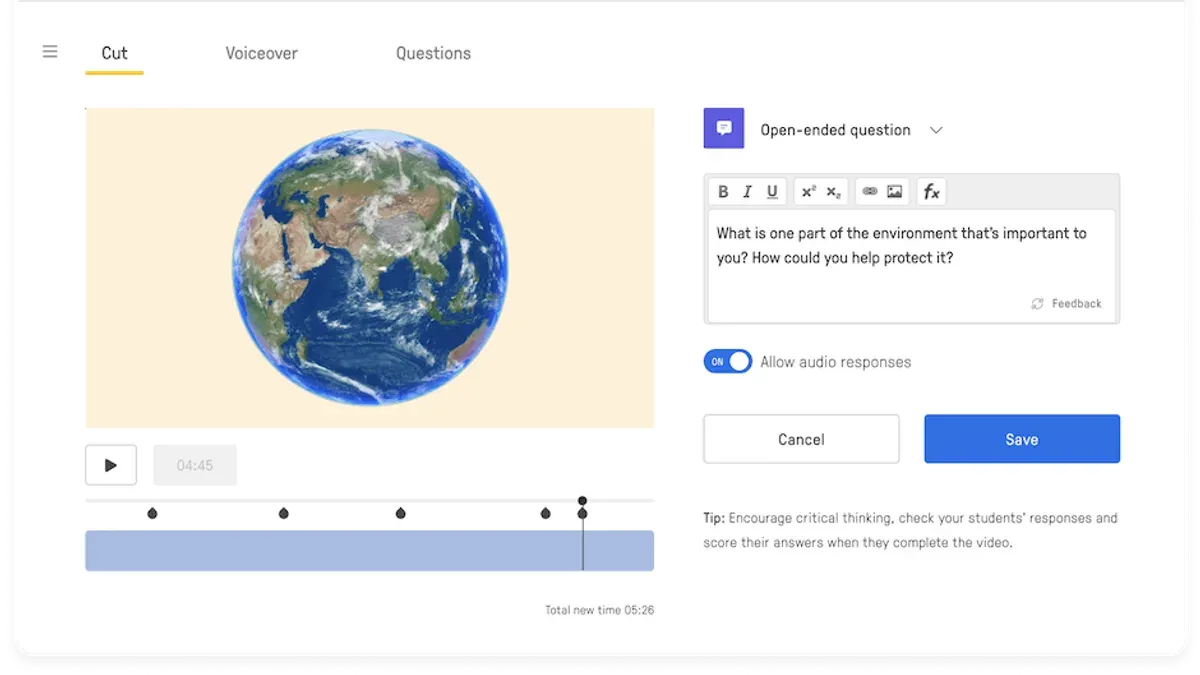
Next, create or curate corresponding videos in Edpuzzle that match your selected content. Use the "Add Content" > "Upload Video" or "Search Videos" features. Allocate a day or two for video selection and initial editing.
Build interactive questions directly within each video using Edpuzzle’s question tools—multiple choice, open-ended, or true/false. Aim for 3-5 questions per video to maintain engagement without overload.
Run a pilot with a small group of students or colleagues. Provide a simple feedback form covering ease of navigation, content clarity, and engagement. For example: "Did you find the video questions helpful?" or "Was the platform easy to use?" Collect responses over one week.
Train your students on Edpuzzle navigation and expectations through a brief demo session or tutorial video. Highlight how to submit answers and track progress.
Use Edpuzzle’s analytics dashboard to monitor student engagement and completion rates during the pilot. Adjust video length or question difficulty based on data insights.
Plan for ongoing content review and updates every 4-6 weeks to keep lessons fresh and aligned with curricular changes.
- Audit and select Quizlet content (1-2 hours)
- Create/curate Edpuzzle videos (1-2 days)
- Build interactive video questions (per video)
- Pilot lessons with feedback form (1 week)
- Train students on platform use (1 session)
- Monitor analytics and refine lessons (ongoing)
- Schedule regular content updates (monthly/bi-monthly)
For instance, if you migrate a Quizlet vocabulary set on environmental science, find related Edpuzzle videos, add questions on key terms, pilot with your class, and adjust based on engagement metrics and student feedback before full rollout.
Read next
- Moving from Quizlet to Blooket Checklist: A Practical Educator’s Guide
- Switching from Quizizz to Edpuzzle: A Practical Educator’s Guide
- Switching from Pear Deck to Edpuzzle: A Confident Educator’s Guide
- Moving from Padlet to Edpuzzle Checklist: A Confident Educator’s Guide
Frequently asked questions
How do I export Quizlet flashcards to Edpuzzle?
Quizlet does not offer a direct export feature to Edpuzzle since they focus on different content types. To migrate your flashcard content, you need to manually copy key terms and definitions from Quizlet. Then, create Edpuzzle videos where you embed this content as questions or notes alongside relevant video segments. This approach adapts your flashcard material to Edpuzzle’s interactive video format rather than a direct transfer.
Can I use Edpuzzle for free or do I need a paid plan?
Edpuzzle offers a free basic plan that allows you to create interactive videos with up to a certain number of students and video content. However, advanced features like detailed analytics, larger class sizes, and premium content libraries require a paid subscription. Evaluate your class size and feature needs to decide if the free tier suffices or an upgrade is necessary.
What types of questions can I add in Edpuzzle videos?
Edpuzzle supports multiple question formats including multiple-choice, open-ended, true/false, and short answer questions. You can also insert audio notes and comments within videos to guide student engagement. This variety allows you to tailor interactions to your teaching goals and assess comprehension in multiple ways.
How can I prevent students from finding free answers to Edpuzzle questions?
To minimize answer sharing, use Edpuzzle’s feature to randomize question order and restrict the number of attempts per student. You can also set questions to require typed responses or explanations that discourage simple copying. Additionally, monitor student progress closely and integrate questions that require critical thinking rather than memorization.
Quick checklist
- Review your Quizlet sets and identify key terms and concepts to highlight in video lessons.
- Download or link to videos relevant to your curriculum that align with your Quizlet content.
- Use Edpuzzle’s editing tools to add questions, notes, and voiceovers at strategic points in your videos.
- Set up classes and assign interactive videos through Edpuzzle’s dashboard, enabling student tracking.
- Communicate changes clearly to students, emphasizing the new interactive format and expectations.
- Monitor student engagement and use Edpuzzle’s analytics to adjust your teaching strategies as needed.
- Prepare backup plans for students with limited internet access or device constraints.
This guide does not cover switching from Quizlet to Edpuzzle for subjects or student groups that require offline or non-video based assessments.
If your curriculum demands offline study tools or assessments that cannot be adapted to video formats, consider retaining Quizlet or exploring other platforms designed for those needs. Edpuzzle’s strength lies in integrating interactive video content, so it may not be the best fit for all instructional contexts.
The single most useful next step is to start by creating a simple interactive video lesson in Edpuzzle using one of your most familiar Quizlet topics. This hands-on experience will reveal how you can effectively translate your existing content into engaging, trackable video lessons and help you identify adjustments before a full-scale rollout.