Moving from MagicSchool AI to Google Gemini: Your Practical Checklist
This checklist guides education coordinators through a smooth migration from MagicSchool AI to Google Gemini, preserving workflows and minimizing downtime.

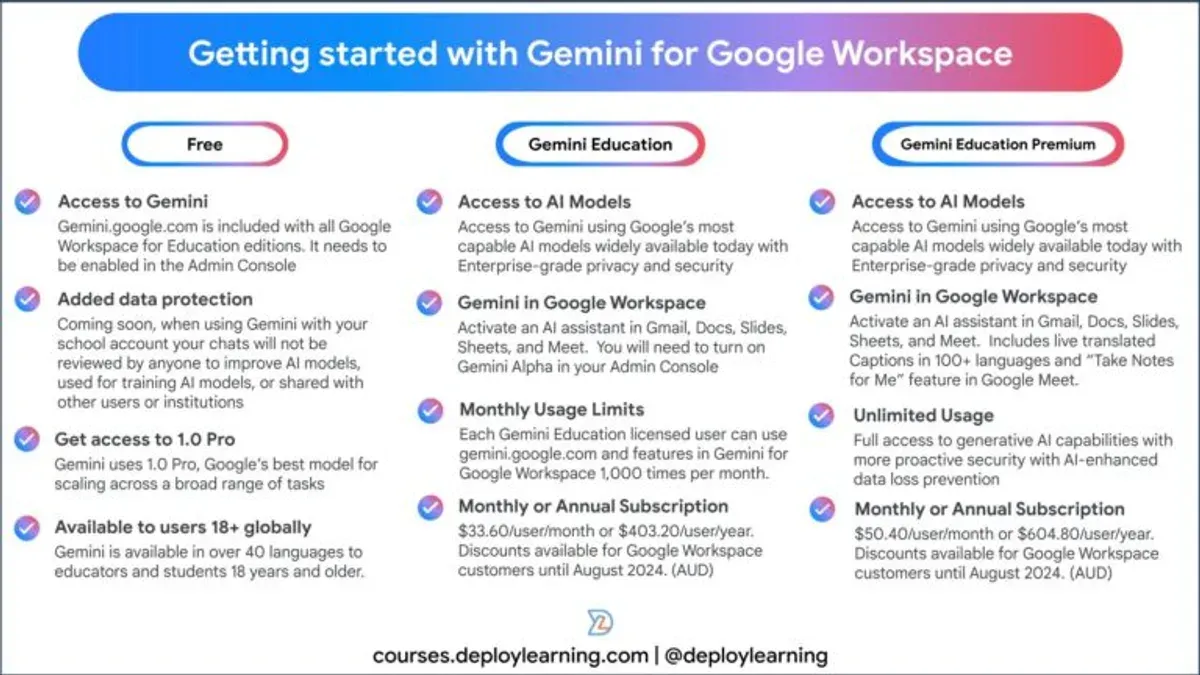
Short answer: Moving from MagicSchool AI to Google Gemini requires careful planning to preserve your custom educational workflows and data integrity. The moving from MagicSchool AI to Google Gemini checklist focuses on evaluating platform differences, mapping features, and managing user transition to avoid disruptions.
This article covers the key distinctions between MagicSchool AI’s specialized educational tools and Google Gemini’s versatile AI capabilities. You’ll learn how to navigate the migration process step-by-step, adjust practical applications to fit the new platform, recognize common pitfalls, and ensure a smooth rollout for educators and students alike. The guide targets education technology coordinators and IT decision-makers aiming for a seamless switch with minimal downtime.
What makes Google Gemini different from MagicSchool AI?
MagicSchool AI is built specifically for educational environments, offering tailored lesson planning, student progress tracking, and curriculum alignment tools. Its architecture focuses on domain-specific algorithms optimized for classroom needs, simplifying tasks like adaptive testing and personalized learning paths.
Google Gemini, by contrast, is a broader AI platform designed for general-purpose applications beyond education. It leverages large-scale multimodal models capable of processing text, images, and code, enabling more versatile functionalities but requiring more configuration to match MagicSchool AI’s specialized features.
For example, MagicSchool AI’s automatic quiz generator uses preset templates and embedded education standards, while Google Gemini can generate quizzes from arbitrary content but needs custom prompt designs to align with your curriculum. Integration-wise, MagicSchool AI connects natively with common school management systems, whereas Google Gemini integrates across Google Workspace and supports extensive APIs for custom workflows.
| Feature | MagicSchool AI | Google Gemini |
|---|---|---|
| Focus | Education-specific AI tasks and workflows | General AI platform with broad capabilities |
| Content Types | Text-based and structured educational data | Text, images, code, multimodal inputs |
| Integration | Built-in school system connectors | Google Workspace, APIs, third-party tools |
| Customization | Preset templates and standards | Flexible prompt engineering required |
Third-party benchmarks indicate Google Gemini excels in natural language understanding and multimodal tasks but can require more setup to replicate MagicSchool AI’s turnkey education features. Expect a learning curve during migration but gain a platform adaptable to future educational technologies.
Why should you consider moving from MagicSchool AI to Google Gemini?
You gain scalability with Google Gemini that MagicSchool AI cannot match. Gemini handles growing numbers of users and diverse tasks without slowing performance. For example, a district expanding from a few classrooms to hundreds can rely on Gemini’s cloud infrastructure without needing additional local hardware.
Google Gemini’s AI sophistication extends beyond classroom-specific functions. Its advanced natural language understanding and multimodal capabilities allow you to automate administrative workflows, generate custom lesson enhancements, and integrate with third-party tools seamlessly. This versatility broadens your use cases beyond what MagicSchool AI offers.
Cost and support considerations also favor Gemini. While exact pricing depends on your contract, many organizations find Gemini’s pay-as-you-grow model more predictable than MagicSchool AI’s fixed licensing fees. A recent user satisfaction survey highlighted better support responsiveness and faster issue resolution with Google’s support channels.
One school district reported cutting their AI platform costs by approximately 20% annually after switching and noted improved teacher engagement through Gemini’s flexible features. This example illustrates the potential strategic and financial benefits you can realize by migrating.
How does the migration process from MagicSchool AI to Google Gemini work?
Start by exporting your data from MagicSchool AI via the Admin Console under Settings > Data Management > Export. Choose CSV or JSON format depending on your dataset size and complexity. For example, exporting student interaction logs and custom lesson templates ensures you retain critical content and usage history.
Next, import the exported files into Google Gemini using the Data Import tool found in the Google Admin panel. Map fields carefully; MagicSchool AI’s "Lesson_ID" may correspond to Gemini’s "Module_Code." This step requires adjusting data schemas to fit Gemini’s architecture.
Then, reconfigure workflows and AI prompts. MagicSchool AI’s predefined curriculum prompts won’t transfer directly. Use Google Gemini’s Prompt Builder to recreate or optimize them, adjusting for Gemini’s broader AI context. For instance, replace MagicSchool’s "AdaptiveQuizStart" trigger with Gemini’s custom workflow event tied to student progress metrics.
Finally, train your staff on the new interface and update all operational documentation. Conduct hands-on sessions focusing on importing data, prompt creation, and monitoring AI outputs. Provide quick-reference guides highlighting differences between the platforms to minimize disruptions.
- Export data from MagicSchool AI Admin Console in CSV/JSON.
- Import data into Google Gemini and map fields precisely.
- Rebuild or adjust AI prompts using Google Gemini’s Prompt Builder.
- Train staff on new workflows and update documentation.
What practical applications will change after switching to Google Gemini?
After switching to Google Gemini, you'll notice a shift in how lesson planning is handled. MagicSchool AI typically generates curriculum-specific lesson plans with embedded assessments directly aligned to education standards. Google Gemini, while more versatile, requires you to customize prompts more precisely to replicate this alignment. For example, instead of selecting a preset “Math Grade 5 Lesson,” you’ll use Gemini’s prompt builder to design lesson frameworks, which can produce richer content but needs more upfront input.
Tutoring interactions will also change. MagicSchool AI’s tutoring is tightly focused on curriculum topics, delivering scripted guidance and feedback. With Google Gemini, tutoring can cover broader subject areas and offer more context-aware responses, but you must configure fallback responses and topic boundaries to avoid off-topic replies. Users report that Gemini’s adaptive explanations can be more nuanced but sometimes less consistent without fine-tuning.
Student engagement features differ as well. MagicSchool AI includes built-in gamification and progress tracking tailored to educational goals. Google Gemini relies on integrations with third-party tools for these functions, so you’ll need to set up connections via APIs or Google Workspace add-ons. Leveraging Gemini’s strengths means planning workflows that combine its advanced natural language understanding with complementary software for engagement and assessment.
- Customize Gemini prompts carefully to maintain curriculum alignment in lesson plans
- Configure tutoring fallback responses to ensure topic relevance
- Integrate third-party tools for gamification and progress tracking
- Train staff on prompt engineering and workflow adjustments
What common mistakes should you avoid during this transition?
Underestimating training and change management can derail your migration from MagicSchool AI to Google Gemini. For example, a school district skipped dedicated training sessions, assuming staff would adapt quickly. This led to confusion with new AI workflows and delayed full adoption by months. You must allocate time and resources to thorough staff training and clear communication plans.
Ignoring data compatibility and security issues is another frequent pitfall. MagicSchool AI uses proprietary data formats that may not map neatly into Google Gemini’s schema. Failing to verify this beforehand can cause data loss or corruption. Additionally, overlook security settings during migration risks exposing sensitive student information. Always conduct a detailed data audit and security review.
Skipping pilot testing or a phased rollout often creates unexpected disruptions. One educational organization switched all classrooms simultaneously and faced widespread technical difficulties and workflow breakdowns. A phased approach helps identify issues early and reduces risk across your network.
- Invest in comprehensive training and change management plans
- Perform detailed data compatibility and security audits
- Run pilot tests or use phased rollouts before full deployment
How can you ensure a smooth rollout and adoption of Google Gemini?
Begin by establishing clear milestones within a detailed rollout timeline. For instance, set Week 1 for initial user access and basic training, Weeks 2-3 for pilot testing with select teachers, and Week 4 for full deployment. Incorporate regular feedback loops by scheduling weekly check-ins via the platform’s built-in survey tool under Settings > User Feedback. This keeps users engaged and surfaces issues early.

Provide ongoing support through a dedicated internal helpdesk email and a shared resource hub containing step-by-step guides and video tutorials accessible from your intranet. Use templates for common issues and FAQs to streamline responses and reduce downtime. Make sure support staff are trained on Google Gemini’s Admin Console, especially the User Management and Reporting sections.
Monitor performance continuously by reviewing usage reports in Admin Console > Analytics Dashboard. Track key metrics like active user count, average session duration, and error rates. Adjust configurations such as AI model settings or integration parameters based on this data to optimize workflows. For example, if tutoring session engagement drops, tweak the AI’s prompting settings found under AI Settings > Personalization.
- Create a rollout timeline with weekly milestones
- Set up regular user feedback sessions
- Establish a helpdesk with clear support templates
- Train support staff on Admin Console features
- Monitor analytics and adjust configurations accordingly
Frequently asked questions
Can I use Google Gemini alongside MagicSchool AI during the transition?
Yes, you can run Google Gemini alongside MagicSchool AI to minimize disruption. Use distinct user profiles or device configurations to separate workflows. This parallel use allows testing and gradual adaptation without immediate cutover risks.
Will I lose any MagicSchool AI features after switching?
Some MagicSchool AI specialized educational features may not have direct equivalents in Google Gemini. However, Google Gemini offers broader customization and integration options that can replicate or enhance your current setup. Plan to rebuild specific workflows or tools using Google’s APIs and custom modules.
How much time should I allocate for a full migration?
Migration duration varies by organization size and complexity but typically ranges from several weeks to a few months. Allocate time for data export, system configuration, staff training, and iterative testing. Avoid rushing to prevent workflow interruptions and data loss.
What technical skills are needed to manage this switch?
You need proficiency in cloud platform management, API integration, and data migration tools. Familiarity with Google Cloud Console, Google Gemini’s admin settings, and scripting for automation is crucial. Basic knowledge of MagicSchool AI’s export/import features also helps streamline the transition.
What this advice does not cover
This guide does not cover migrating from MagicSchool AI custom-developed extensions or integrations that require bespoke redevelopment for Google Gemini. If your setup relies heavily on tailor-made plugins or deeply integrated third-party tools unique to MagicSchool AI, you will need specialized development resources to rebuild those features for Google Gemini. Additionally, advanced data migration involving proprietary student analytics modules may require consultation with both vendors' technical teams.
Quick checklist
- Review all current MagicSchool AI custom features and identify those needing redevelopment.
- Export your existing user data and content through MagicSchool AI’s admin portal under Settings > Data Export.
- Set up Google Gemini accounts and configure user roles via Admin Console > User Management.
- Map MagicSchool AI workflows to equivalent Google Gemini tools, prioritizing lesson planning and grading modules.
- Test key functionalities in Google Gemini sandbox before full rollout.
- Schedule phased training sessions for educators covering new processes and interface changes.
- Monitor user feedback during initial weeks and adjust configuration accordingly.
The single most useful next step is to initiate a pilot migration with a small group of educators. This will reveal unforeseen gaps and allow you to tailor the transition plan before scaling across your organization. Start by exporting sample data, setting up the Google Gemini environment, and running typical teaching scenarios side-by-side. This hands-on trial is critical to minimize disruption and ensure your move to Google Gemini supports uninterrupted teaching workflows.
See also: Moving from MagicSchool AI to ChatGPT: Your Clear-Cut Checklist · Switching from Google Gemini to MagicSchool AI: A Practical Guide · Google Gemini Rollout Plan: A Practical Guide for Office Managers · Google Gemini Implementation Timeline: What You Need to Know