How to Recover and Secure a Nintendo Account After a Hack
This guide explains how to recover a hacked Nintendo account and secure it against future breaches to protect your purchases and personal data.

This article explains how to recover a Nintendo account hacked by unauthorized parties and secure it against future breaches. A compromised Nintendo account can lead to lost purchases, unauthorized gameplay, and exposure of personal information. Understanding the common methods hackers use and the practical recovery steps can prevent prolonged access loss and repeated attacks.
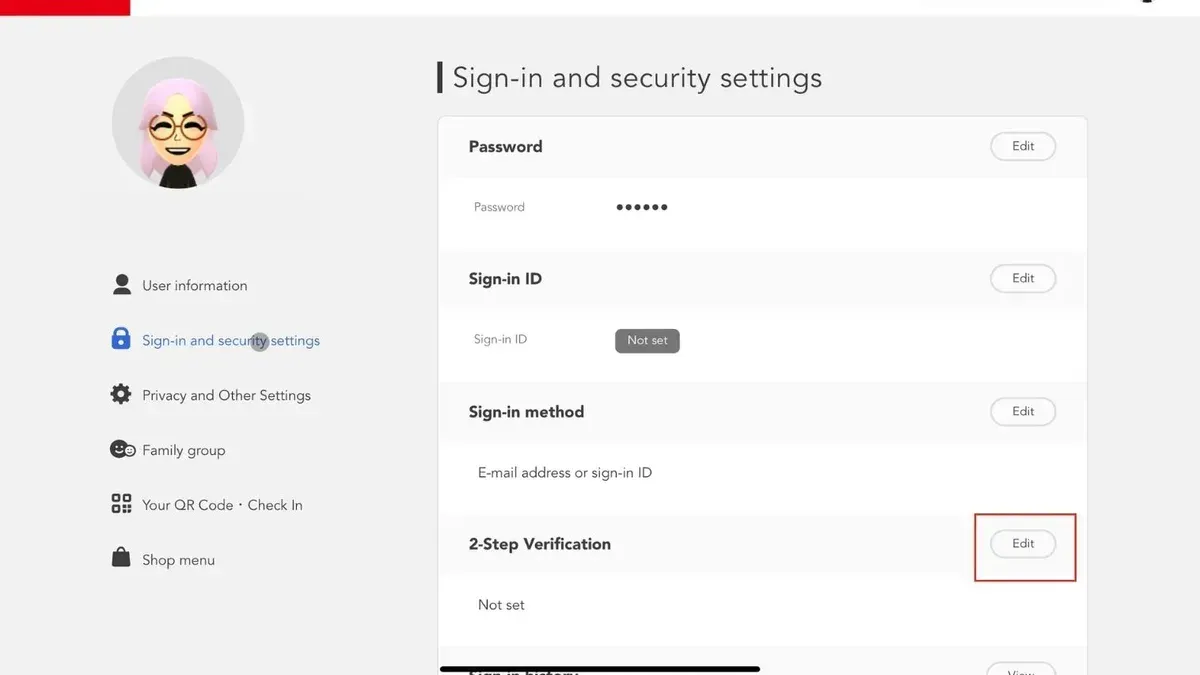
Immediate action often involves verifying account details via the Nintendo Account website, changing linked email passwords, and enabling two-step verification in the account settings menu. This guide highlights overlooked steps such as checking the account activity log and contacting Nintendo support when standard recovery is insufficient.
Clear knowledge of how hackers exploit weak passwords, phishing attempts, or reused credentials helps users avoid repeating mistakes that lead to breaches. The article also covers what to do if access to the linked email is lost and how to report suspicious activity to Nintendo effectively.
What is a Nintendo account hack and why does it matter?
A Nintendo account hack occurs when an unauthorized person gains access to or control over a Nintendo account. This breach can lead to severe consequences, including loss of saved game progress, unauthorized purchases charged to linked payment methods, and exposure of personal information such as email addresses and billing details.
Nintendo accounts are attractive targets for hackers because they often store digital assets like purchased games, downloadable content, and in-game currency. Additionally, many users link credit cards or PayPal accounts for quick purchases, increasing financial risks if the account is compromised. The gaming identity tied to the account also holds value, as it can be sold or used to tarnish reputations in multiplayer communities.
Common attack methods include phishing scams, where users are tricked into providing login details through fake websites, and credential stuffing, which uses leaked usernames and passwords from other breaches to access Nintendo accounts. Globally, gaming accounts are frequently targeted, contributing to millions of compromised accounts annually, although exact Nintendo-specific figures are less often publicized.
For example, a user who falls victim to a phishing email may unknowingly hand over their credentials, allowing a hacker to log in, spend hundreds of dollars on eShop purchases, and then lock the original owner out. This scenario not only causes financial loss but also disrupts access to the user’s digital library and personal data.
Can your Nintendo account get hacked and how does it happen?
Nintendo accounts are vulnerable to hacking primarily through indirect methods rather than breaches of Nintendo's own systems. Common attack vectors include phishing emails that mimic official Nintendo communication, tricking users into entering credentials on fake login pages. For example, a gamer might receive an email claiming their account was suspended, with a link to a realistic-looking but fraudulent site asking for login details.
Weak or reused passwords are another major risk. Many users reuse passwords from other services; when unrelated sites suffer data breaches, attackers use those leaked credentials to attempt logins on Nintendo accounts, a technique known as credential stuffing. This exploit relies on users having the same email and password combination across multiple platforms.
Malware installed on a device can also harvest credentials or session tokens, granting hackers access without needing passwords directly. Social engineering plays a key role by manipulating users into revealing sensitive information, often by creating a sense of urgency or using technical jargon to confuse them.
Unlike some major tech companies, Nintendo has not experienced a widely publicized system-wide hack. However, individual accounts remain at risk due to these common vulnerabilities outside Nintendo’s direct control.
How to recover a hacked Nintendo account
Start by immediately changing the Nintendo account password via the Nintendo Account website under "Sign-in and security settings." If the linked email account is accessible, update its password as well to prevent further unauthorized access. Next, review linked payment methods and remove any unfamiliar cards or PayPal accounts found in the "Shop Menu" under "Payment Methods."
Use Nintendo’s official account recovery tool by selecting "Forgot your password?" on the login page. After entering the registered email, follow the instructions sent to regain access. If locked out completely, contact Nintendo Support with proof of ownership, such as purchase receipts or console serial numbers, to verify identity and request manual recovery. Response times vary but typically range from a few days to over a week depending on verification complexity.
If the linked email is inaccessible, initiate recovery through the Nintendo Support contact form, explaining the email loss. Nintendo may require additional verification steps, including security questions or billing information, to proceed.
After regaining access, check the "Purchase History" under "Shop Menu" for unauthorized transactions. Report suspicious charges via Nintendo Support to request refunds or dispute charges. Acting quickly improves chances of reversing fraudulent activity.
Example: A user notices unknown purchases on their account. They change their Nintendo password, secure their email, remove unauthorized payment methods, and use the recovery tool. When locked out of their email, they provide purchase receipts to Nintendo Support and regain access after a few days, then dispute the fraudulent transactions successfully.
How to get rid of a Nintendo account safely
Removing or deleting a Nintendo account is advisable when there are security concerns, such as persistent hacks, or when the account is no longer used. Unlike temporarily suspending access by changing passwords or unlinking devices, deleting an account is permanent and results in the loss of all game data, purchase history, linked services, and any associated digital content. Backing up important information, like screenshots or save data linked to cloud services, is essential before proceeding.
To unlink a Nintendo account from devices, navigate to the device’s user settings and select “Unlink Nintendo Account.” For example, on a Nintendo Switch, go to System Settings > Users > [User] > Unlink Nintendo Account. This disconnects the account from that device but does not delete the account itself.
Deleting the account requires logging into the Nintendo Account website and selecting “Delete Account” from the account settings menu. The system will warn about losing access to all purchases, memberships like Nintendo Switch Online, and any linked services such as My Nintendo. Nintendo’s official policy states that account deletion is irreversible, and users should consider this carefully.
For instance, if a player stops using Nintendo entirely and worries that their compromised account might be exploited again, deleting the account removes all personal data from Nintendo’s services. This is safer than leaving an inactive but vulnerable account linked to devices or emails.
Tip: Before deleting, export any necessary information and unlink the account from all devices to prevent residual access.
Why do I keep getting hacked and why do people hack in games?
Repeated hacks often stem from weak passwords, lack of two-factor authentication (2FA), and vulnerability to phishing attacks. Many users overlook enabling 2FA through the Nintendo Account settings menu, which significantly reduces unauthorized access risks. Hackers exploit these gaps by using automated credential stuffing tools that test stolen username-password combinations across multiple accounts swiftly. For example, if a password was leaked in a data breach elsewhere, attackers try it on Nintendo accounts, causing repeated breaches.
Hackers target gaming accounts for several reasons: financial gain through selling accounts on black markets, stealing personal information, or gaining unfair advantages in games. Accounts with rare digital items or linked payment methods are especially valuable. A concrete case involves accounts sold on underground forums where buyers seek access to high-level game progress or exclusive content.
Gaming communities and ecosystems are attractive targets because they combine personal data with monetizable assets. Automation enables attackers to attempt thousands of logins per minute, increasing the chances of success, especially when users reuse passwords. The recurring hacks often reflect systemic security oversights rather than isolated incidents.
Tip: Regularly update passwords to strong, unique ones and enable two-factor authentication in the Nintendo Account security settings to block most automated attacks.
What if you have a Nintendo account but lost access to the linked email?
Access to the registered email is crucial for Nintendo account recovery because password reset links and security notifications are sent there. Losing this access complicates recovery but does not make it impossible. Nintendo provides alternative methods such as answering security questions set up during account registration or contacting Nintendo Support directly for identity verification.
For example, if an account holder cannot receive password reset emails, they can navigate to Nintendo’s support page and fill out the account recovery form. This process requires submitting proof of ownership like purchase receipts, console serial numbers linked to the account, or billing information. Nintendo Support typically responds within a few business days, guiding the user through identity verification steps to regain control.
Tip: When contacting support, provide as many details as possible to speed up verification and recovery.
Once access is restored, securing the new email account is vital. This includes enabling two-factor authentication on the email, using a strong unique password, and reviewing security settings to prevent future lockouts or breaches linked to the email itself.
Consider a scenario where a user lost their email password and could not reset it. By contacting Nintendo Support with a recent digital purchase receipt and console info, they verified identity and updated the account email. Afterward, they secured the new email with multi-factor authentication to protect against future attacks.
How to get a Nintendo account and secure it from the start
Begin by visiting the official Nintendo Account registration page and entering accurate personal details. Choose a strong, unique password combining uppercase letters, lowercase letters, numbers, and symbols; avoid common words or patterns. Password strength significantly reduces the risk of unauthorized access, with complex passwords far outperforming simple ones in security tests.
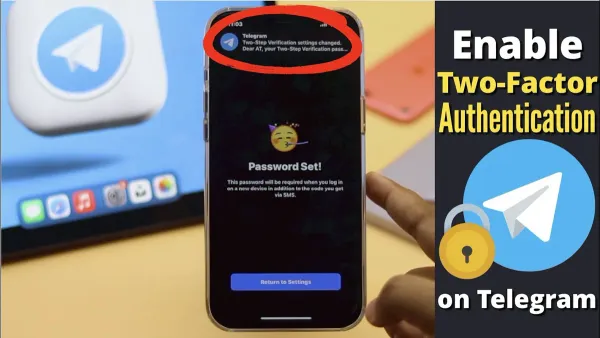
Enable two-factor authentication (2FA) immediately after account creation via Account Settings > Sign-in and Security > Two-Step Verification. This adds a second layer of defense by requiring a time-sensitive code from an authenticator app or SMS in addition to the password. Accounts with 2FA enabled experience far fewer successful breaches compared to those without it.
Use a reputable password manager to generate and store complex passwords securely. This prevents reuse and makes managing multiple credentials manageable. Avoid sharing login details or writing them down in insecure places.
New users should remain vigilant against phishing attempts, which often come as fake Nintendo emails prompting login or password reset. Check email sender addresses carefully, avoid clicking suspicious links, and access Nintendo services directly through official websites or apps. For example, a phishing email might mimic Nintendo branding but use a misspelled domain like “nintendo.com.”
Tip: After creating the account, review recent login activity in Account Settings to spot any unauthorized access early.
How to report illegal Nintendo hacking and locked out of Nintendo account situations
When a Nintendo account is hacked or access is lost due to unauthorized activity, reporting to Nintendo promptly is essential. Use Nintendo's official support website at support.nintendo.com or contact their customer service by phone. Navigate to the “Account & Security” section and select “Report a problem with your Nintendo Account” to start the process.
Before reporting, gather necessary documentation: proof of account ownership such as purchase receipts, linked email addresses, and any suspicious activity logs or emails. This information speeds up verification and investigation.
After submitting a report, Nintendo initiates an investigation that can take several days to weeks depending on complexity. During this period, expect communication via the registered email. Nintendo’s security policy states they will work to restore account access or permanently disable compromised accounts if necessary.
Tip: While waiting for resolution, change passwords on other linked services and enable two-factor authentication to limit further damage.
For example, a user who noticed unauthorized purchases reported the issue via Nintendo’s online form with attached receipts and screenshots. Nintendo responded within a week, temporarily suspending the account and guiding the user through recovery steps. This proactive reporting minimized loss and restored control securely.
Frequently asked questions
How to get rid of nintendo account?
To delete a Nintendo account, log into the Nintendo Account website and navigate to "User Settings." From there, select "Delete Account" and follow the on-screen instructions. Note that this action is irreversible and will remove all linked game data, purchases, and subscriptions. Ensure any important information is backed up before proceeding.
How did my amazon account get hacked?
Amazon accounts can be hacked through phishing emails, reuse of compromised passwords, or malware on devices. Attackers often obtain login credentials from data breaches of other services and try them on Amazon accounts. Using weak or repeated passwords increases vulnerability.
Why my account is hacked?
Accounts are commonly hacked due to weak passwords, phishing scams, or failure to enable two-factor authentication. Reusing passwords across multiple sites makes it easier for hackers to gain access once one account is compromised. Lack of regular password updates and security awareness also contribute.
Why do instagram accounts get hacked?
Instagram accounts often get hacked through phishing links, stolen credentials from other breached sites, or social engineering tactics. Inadequate password strength and absence of two-factor authentication increase the risk. Attackers may also exploit third-party apps with excessive permissions.
How did my Amazon account get hacked and is it related to Nintendo?
Amazon account hacks usually result from credential theft or phishing and are typically unrelated to Nintendo accounts unless the same password or email is used for both. Using identical login details across platforms enables hackers to breach multiple accounts after compromising one. Always use unique passwords and enable two-factor authentication on all accounts.
What this advice does not cover and who should do something else
This guide does not cover recovery of accounts hacked through hardware theft or physical device compromise. Users who lose both access to their Nintendo account and the linked email face significant challenges and may require direct intervention from Nintendo Support, which can involve delays or inability to recover the account. The advice provided does not guarantee account recovery or future breach prevention but reflects best practices based on current Nintendo policies and security standards.
The single most useful next step after suspecting or confirming a Nintendo account hack is to immediately change the account password via the Nintendo Account settings page, enable two-step verification, and check for unauthorized linked devices. Securing the account promptly limits further damage and sets a foundation for recovery and prevention.
See also: How to Recover and Secure a Hacked League of Legends Account · How to Handle a Lemon8 Account Hacked Situation and Related Questions · How to Recover and Protect a Hacked iCloud Account