Webex Implementation Timeline Explained: From Setup to Adoption
This guide explains the critical Webex implementation timeline steps to ensure smooth setup, testing, and user adoption for successful rollout.

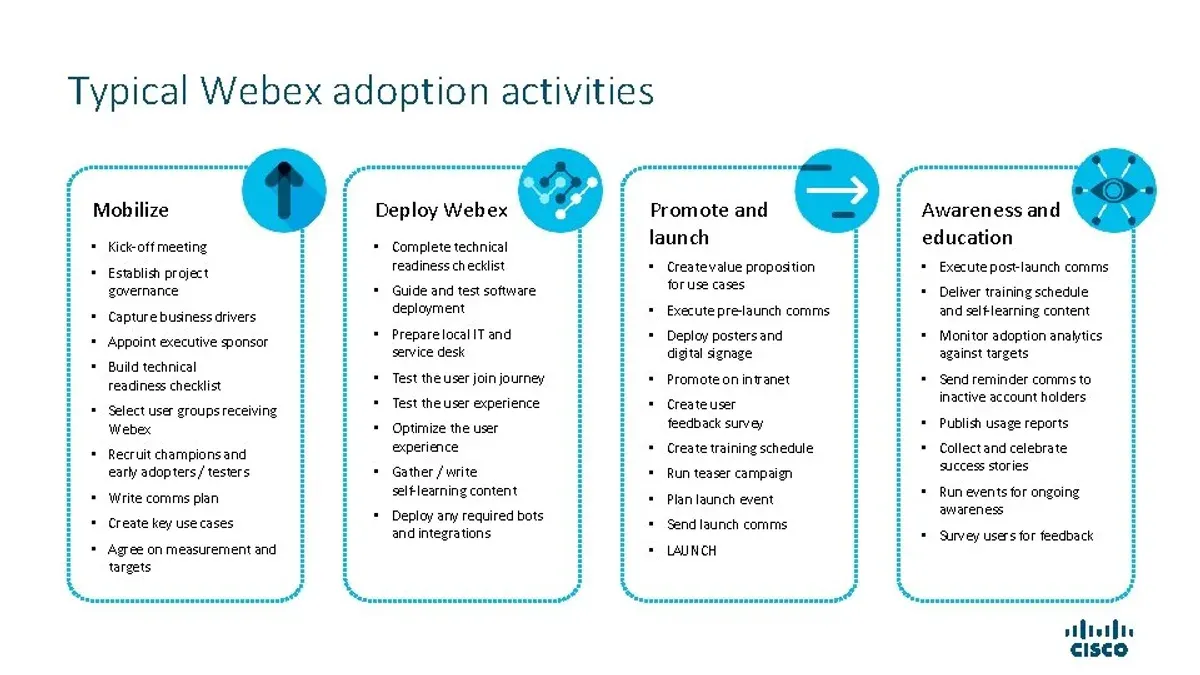
Many projects overlook the sequence of critical steps like kickoff calls, system setup, testing, and user enablement. Control Hub configuration is another frequent bottleneck, essential for secure collaboration but often ambiguously documented. This guide clarifies those timelines and decisions, focusing on what truly affects rollout speed and success beyond generic schedules.
Webex implementation overview
- Proper Control Hub setup prevents errors and accelerates onboarding but requires attention to unclear configuration details.
Last verified November 2026 against Webex Help Center, MaazTechnologies, CallTower (full list at the end).
How long does a Webex Contact Center implementation take?
This timeline allows for initial setup, basic configuration, and testing without extensive customization or multiple system connections.
These projects require careful coordination across sites and systems, increasing the time for validation and adjustments. For example, a multinational company integrating Webex Contact Center with CRM, workforce management, and telephony systems across three continents will experience delays due to the need for staged deployments and comprehensive testing at each phase.
Each additional system or third-party service connected to Webex Contact Center adds configuration and troubleshooting requirements. Similarly, the number of sites involved impacts coordination efforts and resource allocation.
Organizations with simple setups should plan for a six-week window, while those with complex needs must prepare for a multi-month phased approach. Clear understanding of deployment scope prevents common pitfalls associated with underestimated timelines.
Webex Contact Center implementation timeline details provide the basis for these expectations.
What are the key phases in a Webex implementation project?
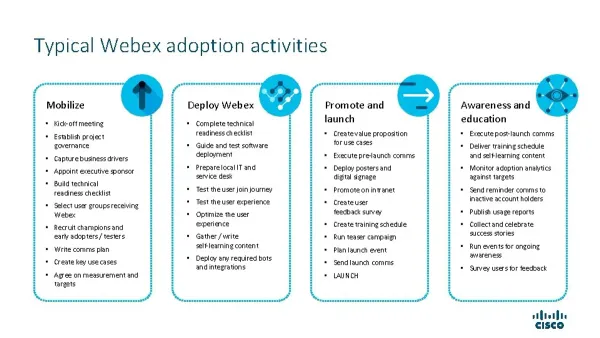
The Webex implementation project follows a structured lifecycle managed by an Implementation Project Manager (IPM), who coordinates stakeholders and ensures timely progress. It begins with a kickoff call to align all parties on objectives, scope, and roles, setting the foundation for the project. This initial alignment prevents miscommunication that can derail schedules later.
The next phase is system setup and testing. This involves configuring the Webex environment, including Control Hub settings and integrations, then verifying functionality before broader deployment. Skipping or rushing this step risks critical failures during go live, causing delays and user frustration.
Go live marks the initial deployment of Webex services to the user base. It must be carefully planned and communicated to avoid disruption. After launching, user enablement and adoption activities take priority—training sessions, resource sharing, and feedback loops help embed the platform into daily workflows.
Finally, the project moves to finalization, optimization, and closeout. The IPM reviews system performance, addresses any lingering issues, and documents lessons learned. This phase ensures the deployment delivers expected value and transitions smoothly into ongoing management.
For example, if the IPM proceeds with user training before confirming system stability, adoption efforts will falter due to unresolved technical problems. Proper sequence—kickoff, setup and test, go live, enablement, and closeout—avoids such pitfalls and keeps the rollout on track.
How does Control Hub configuration impact the rollout timeline?
Control Hub setup is a critical step that must be completed before deployment to avoid scheduling conflicts and joining errors. Access the Control Hub dashboard via Configure services, where administrators enable essential security and scheduling settings. Neglecting these configurations often leads to disrupted meetings, delayed starts, and user frustration that extend the rollout timeline.
Properly configuring Control Hub accelerates onboarding by streamlining user access and permissions. The Control Hub Essentials guided configuration tool walks through key settings, ensuring the environment is optimized for security and usability. This reduces the time spent troubleshooting and training, directly improving user satisfaction and adoption rates.
For example, enabling the correct scheduling permissions within Control Hub prevents external users from inadvertently joining restricted meetings. This control not only protects sensitive information but also cuts down on support tickets post-launch. Following the prescribed paths and using guided tools ensures settings are accurate and consistent across the organization, which keeps implementation on track and avoids last-minute configuration fixes.
In summary, investing time upfront to configure Control Hub properly safeguards the collaboration environment, prevents common technical setbacks, and speeds user onboarding. Skipping or rushing these steps almost always leads to delays and a more complex rollout process. Administrators should prioritize Control Hub configuration as a foundational task to maintain timeline integrity.Learn more about Control Hub setup.
How to create a Webex rollout plan that drives adoption?
Start by identifying relatable use cases that demonstrate how Webex fits into daily workflows. For instance, illustrate how a sales team uses Webex Messaging and Meetings to accelerate deal closures, making the tool's benefits tangible and clear. Without relatable scenarios, users struggle to see value, leading to poor engagement.
Set measurable goals that include usage analytics from Control Hub, business performance indicators, and qualitative success stories. Track metrics like active users, meeting frequency, and collaboration patterns to gauge adoption progress. Combine these with narratives highlighting productivity improvements or time savings to maintain momentum. This dual approach ensures adoption is not just a checkbox but a measurable business outcome.
Leadership advocacy is critical. Secure executive sponsorship early to champion the rollout and define clear responsibilities. Identify and prepare user champions within teams to address questions and model behaviors. Their presence bridges the gap between management directives and everyday user needs, fostering trust and accelerating adoption.
Leverage Webex Adoption Launch Kits, which provide customizable quick start guides, email templates, and videos ready for deployment. These kits streamline communications and training, reducing friction and reinforcing key messages. A rollout plan combining these elements creates a structured, measurable, and supported adoption path that drives real user engagement. Learn more.
What common issues can delay or disrupt a Webex implementation?
Incorrect setup in the Webex Events Event Planning Document is a frequent source of delay. Selecting wrong products or filters leads to invalid errors and triggers incorrect timeline tasks. For instance, failing to clear all filters before reselecting the correct products such as 'Attendees' and 'Sessions' can cause the system to generate errors that stall progress. The fix is straightforward: always clear filters completely and carefully reselect the exact products needed.
Lack of user awareness and unclear use cases also undermine adoption, which can derail implementation success. When users do not understand how Webex fits into their daily workflows, adoption stalls and rollout objectives fail. Effective communication plans, gamification strategies, and sharing relatable use cases are required to embed Webex into user routines and maximize engagement.
Without committed leaders defining responsibilities and driving adoption, rollout efforts lose direction and momentum. Sponsors must actively prepare and engage throughout the implementation to maintain focus and remove obstacles.
Proper event planning document configuration, user-centric communication, and strong executive backing form the foundation of a timely and successful Webex implementation.
How to use the Webex Events Event Planning Document effectively?
The Webex Events Event Planning Document is a Google Sheets template that tracks major milestones across six months—from early preparation to post-event activities. Begin by opening the document in Google Sheets and selecting File menu → Make a copy to create an editable version. This step preserves the original template and allows customization without restrictions.
Customization relies heavily on applying the correct filters. Use the Products and Type of Event filters found in the sheet to tailor timeline tasks to the specific event and Webex products involved. Always clear all existing filters completely before selecting new ones. Failing to clear filters first often causes invalid errors or leads to irrelevant timeline tasks, which disrupts planning.
For example, if planning a webinar with attendees and sessions, ensure both are selected under the Products filter. Skipping either can omit critical tasks from the timeline or show tasks that don’t apply. Reset filters fully before changing selections to prevent such errors.
Following this procedure ensures the event timeline reflects the correct milestones and durations—starting up to six months before the event date and covering all critical phases. This approach avoids common pitfalls and aligns planning with Webex’s official event management framework.[source]
What happens after Webex implementation is complete?
Usage analytics become the primary tool to verify adoption, tracking active users, feature engagement, and meeting frequency. These metrics reveal whether the platform supports business goals and highlights areas needing attention. For example, if analytics show low use of messaging features, targeted training or champion support can address this gap.
Optimization continues based on user feedback and system performance data. Adjustments may involve refining Control Hub settings, updating configurations, or resolving user issues rapidly to avoid frustration. Neglecting this phase risks reduced productivity and user attrition despite initial rollout efforts.
Maintaining user engagement requires ongoing communication and involvement of user champions. These advocates promote best practices, share success stories, and help diffuse resistance during updates or policy changes. Leadership support remains critical, reinforcing the platform’s value and aligning it with evolving business needs. Post-implementation is not a project close but a cycle of refinement ensuring long-term value and adoption as outlined in the implementation lifecycle.
How to decide the right Webex implementation approach for your organization?
Choose the implementation approach based on deployment complexity and integration needs. For straightforward Webex Contact Center setups with limited integrations, plan for a 4-6 week timeline. This approach suits single-site environments where minimal customization and few external systems are involved, allowing for a faster, more predictable rollout.
Complex deployments involving multiple sites, diverse integrations, or customized workflows require a phased rollout over 2-4 months. This extended timeline accommodates coordination across locations, integration testing, and staged user onboarding to reduce disruption and manage risks effectively.
Maximizing user adoption demands more than timeline selection. It requires early and visible leadership support, meticulous Control Hub configuration, and a rollout plan anchored in relatable use cases and measurable adoption metrics. Identify and prepare user champions to drive engagement and sustain momentum post-launch.
Consider a mid-sized company with three offices planning to deploy Webex Contact Center integrated with CRM and workforce management systems. A phased rollout over several months allows iterative testing and adjustment at each site. Assigning executive sponsors and configuring Control Hub settings upfront ensures the deployment meets operational needs and secures user buy-in efficiently.
Aligning deployment strategy with organizational scale, complexity, and adoption goals streamlines implementation and strengthens outcomes. The decision matrix below summarizes the guideline:
| Organizational Situation | Recommended Approach | Key Decision Factor |
|---|---|---|
| Straightforward deployment, limited integrations | 4-6 week implementation | Minimal complexity and single-site focus |
| Complex deployment, multiple sites and integrations | Phased rollout over 2-4 months | Coordination and integration requirements |
| Maximizing adoption and engagement | Strong leadership, proper Control Hub setup, measurable plan, user champions | User engagement strategy |
Planning accordingly prevents timeline overruns and adoption failures, securing a successful Webex deployment based on practical timelines.
When to seek specialized Webex support beyond timeline guidance
Choosing the right implementation approach depends on organizational size, existing infrastructure, and user readiness. Small teams with basic needs can proceed with a standard phased rollout emphasizing Control Hub setup and Events document planning. Larger enterprises facing complex user hierarchies or hybrid environments benefit from a staged approach prioritizing early stakeholder alignment and detailed configuration sequencing. Those aiming for rapid adoption should integrate change management closely with rollout milestones, leveraging the Event Planning Document’s filters under the Setup > Event Management menu for targeted communication.
Documentation used
- Webex Events Planning Best Practices Timeline — Webex Help Center
- How long does a Webex Contact Center implementation take for an enterprise environment? | Maaz Technologies — MaazTechnologies
- Webex Implementation Guide — CallTower
- 5 simple ways to drive Webex adoption | Webex Blog — Webex Blog
- Adopt | Adoption methodology — Webex
See also: Switching from Google Meet to Webex: A Practical Guide · Switching from Microsoft Teams to Webex: A Practical Guide · Plan and Manage Your Slack Implementation Timeline Effectively · Master Trello Implementation Timeline: From Setup to Project Success