Moving from monday.com to Trello: How to Set Up Trello Checklists
This guide helps teams move from monday.com to Trello by explaining checklist setup, migration issues, and pricing differences for smooth transitions.

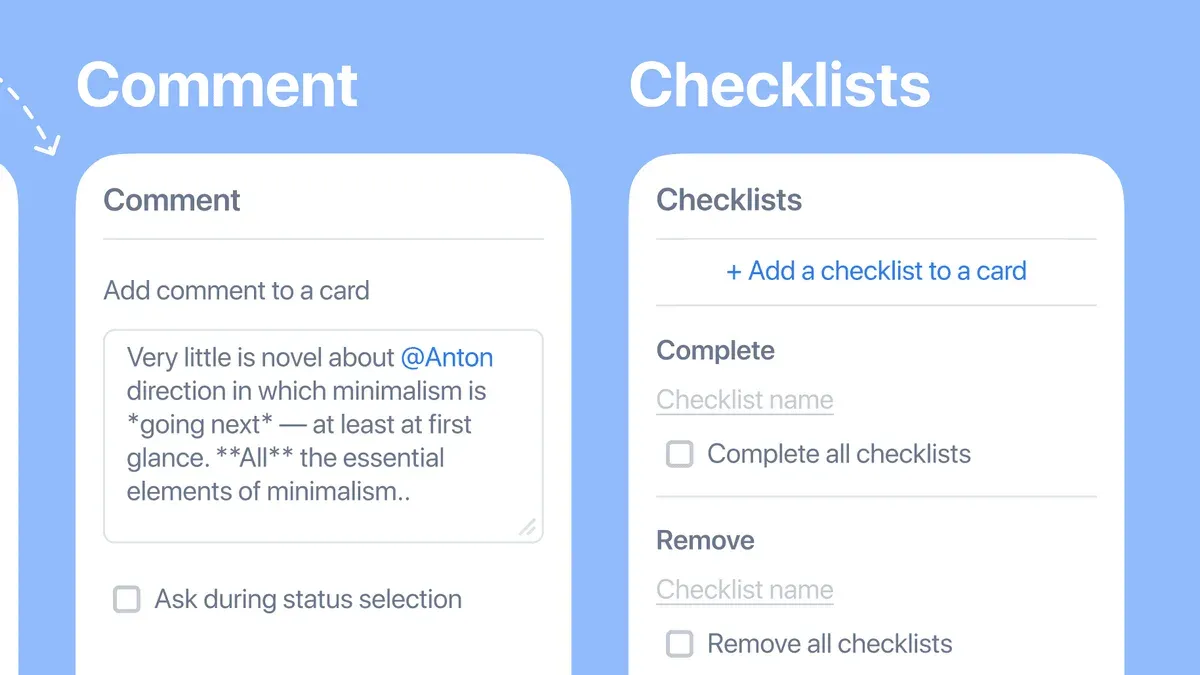
Teams moving from monday.com to Trello face specific challenges around checklist migration and workspace limits.
One key issue is that Trello checklists convert into monday.com subitems, maintaining ownership and status fields. Meanwhile, Trello’s Free workspace caps collaboration at 10 users, restricting migration scope for larger teams. This guide breaks down checklist setup in Trello, migration quirks, and pricing contrasts to support precise planning and smooth execution.
Quick overview of migrating from monday.com to Trello checklist
- Checklists and automation rules require manual adjustments post-migration.
- Trello Standard plan costs $5 per seat monthly, significantly cheaper than monday.com’s $9 Basic plan.
Every limit and setting name below comes from TaskRhino, SpotSaaS, SaaS True Cost (full list at the end), as of November 2026.
How to create a checklist in Trello
Start by opening a card on any Trello board via the website or desktop app. Inside the card, locate the card menu typically on the right-hand side. Click the Add Checklist button to begin creating a new checklist within that card.
Once clicked, a prompt appears to name the checklist and start adding task items. Enter each item name separately and confirm to save. The checklist will then appear as a list of tasks inside the card, visible to all board members.
Checklists are flexible; items can be added, marked complete by checking the box, or deleted as needed. This allows ongoing updates to task progress without creating new cards. For example, a project task card can hold a checklist of key steps, each ticked off as they finish.
The process is consistent across Trello's website and desktop applications, ensuring a uniform experience.
Creating checklists in this way is fundamental for managing tasks effectively in Trello post-migration. The precise path is: open a card → select Add Checklist from the card menu → enter task items → save. This direct approach supports straightforward checklist setup without extra complexity.
How does monday.com compare to Trello for checklists?
Each board consists of items (rows) and multiple columns typed for specific data like status, due dates, and owners.
Checklists in Trello become subitems in monday.com during data migration. Each checklist item transfers as a subitem with its own assigned owner, status, and date, preserving task details but changing how they are accessed and displayed.
Pricing and feature tiers also diverge. Trello’s Standard plan costs $5 per seat per month billed annually, making it $4 cheaper per seat than monday.com’s Basic plan at $9. However, advanced automations and integrations on monday.com start at the Standard plan or higher, while Trello offers simpler automation and workflow options at a lower price point. Teams prioritizing cost savings with straightforward project management often lean toward Trello, whereas those needing complex automations may prefer monday.com’s offerings. Source
What breaks or does not migrate when moving from monday.com to Trello?

Attachments linked from external drives move only as hyperlinks, not as embedded files. Teams must verify these links post-migration to ensure accessibility. Missing files or broken links disrupt task execution and require manual correction.
Trello Inbox cards cannot migrate directly to monday.com. These cards are not exported and must be moved manually into Trello boards before starting the migration process. Failure to do so results in missing or incomplete data transfer.
These aesthetic customizations need to be reapplied after migration if desired.
Exceeding these limits slows or blocks data transfer, necessitating paced migration steps. Ignoring this constraint risks incomplete migration and extended downtime.
Each of these limitations demands proactive management to avoid workflow disruption. For example, ignoring the need to relocate Inbox cards to boards before export results in permanent data loss for those cards. Planning migration order and manual reconfiguration are essential to success.Source
How to map Trello checklists into monday.com after migration
Trello checklists transform into monday.com subitems during migration. This conversion allows each checklist item to carry its own owner, status, and date, preserving task granularity and facilitating detailed project tracking. Using subitems maintains the original checklist's structure, making it easier to manage dependencies and updates individually within monday.com.
Alternatively, Trello checklists can be imported as plain text within a single long text column in monday.com. This option consolidates all checklist items into one field, sacrificing individual task tracking and ownership. While simpler, it limits the ability to update statuses or assign tasks to team members distinctly.
For example, a Trello card with a checklist of five action items will become a monday.com item with five subitems if imported as subitems. Each subitem can then be assigned to different team members and tracked separately by status and due date. If imported as text, the five actions merge into one text block under a long text column, losing task-level management capabilities.
Choosing subitems is recommended when detailed tracking and task assignment remain priorities post-migration. This approach supports better project management continuity, helping maintain checklist separation and status across platforms. Importing as text suits cases where checklist details are less critical or when simplifying data is preferred.
Is Trello having problems today? How to check and what it means for migration
Trello service status is crucial when planning migrations or daily operations. Check the official Trello status page regularly to monitor uptime and incident reports. Community forums and social media channels also provide real-time user feedback on outages or performance issues.
For instance, if Trello’s API rate limit is reached during migration, data transfer may stall until the limit resets. Unexpected downtime means tasks like checklist import or card moves could fail, requiring retries and extending project timelines.
Avoid starting a major data transfer during or immediately after reported outages. This precaution helps prevent partial imports or data loss. A concrete case: attempting to migrate checklists while Trello is experiencing API throttling can cause incomplete checklist imports or missing task statuses.
It allows pausing or rescheduling critical actions, minimizing disruption. Teams should prepare fallback plans if access to Trello is temporarily unavailable, such as exporting data locally prior to migration.
How to plan the order of operations when migrating from monday.com to Trello
This step ensures correct mapping of assignees during export. Skipping it results in lost or incorrect task ownership after migration.
Next, address Trello Inbox cards. These cards cannot be exported or migrated to monday.com. Move any important Inbox cards to active boards within Trello before starting the export process to avoid data loss.
Export boards, lists, cards, and checklists from monday.com using supported importers or CSV files. Then import this data into Trello. Note that Trello’s Butler automation rules do not transfer automatically and must be manually rebuilt after data import.
This parallel operation time uncovers synchronization issues or missing data without forcing an immediate full cutover. Skipping this step to save licensing costs often prolongs recovery if problems arise.
During migration, monitor Trello API rate limits carefully. Exceeding these limits can slow or block data transfer, especially for large workspaces. Pace the import process to stay within allowed thresholds and prevent throttling.
For example, if a project manager exports monday.com data before inviting all users, task assignments may not carry over, requiring manual reassignment. Likewise, ignoring Inbox cards in Trello leads to missing cards post-migration. Following the correct sequence preserves data integrity and reduces downtime.
Workspace settings → Invite users before import to map assignees correctly
How does Trello’s pricing and limits compare to monday.com for teams moving over?
Comparing costs and team size limits is critical when planning a migration from monday.com to Trello. Trello’s Standard plan costs $5 per seat per month billed annually, whereas monday.com’s Basic plan starts at $9 per seat per month billed annually. This $4 difference per seat each month can significantly reduce expenses for larger teams focused on checklist and project management.
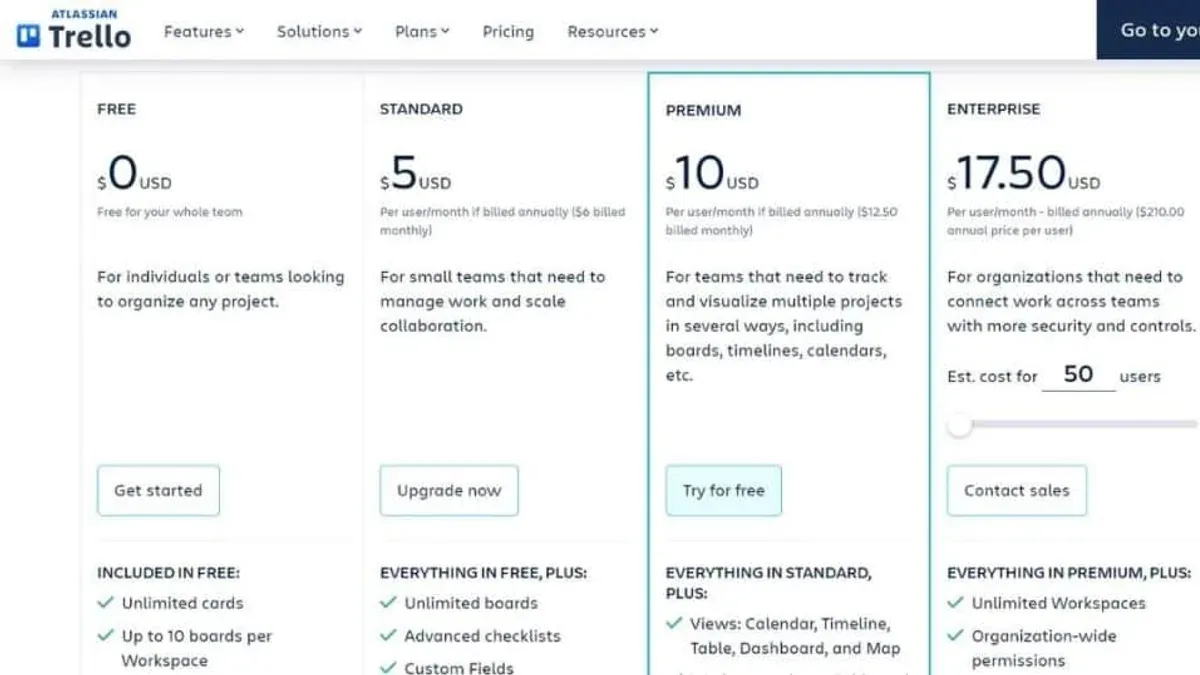
Trello’s Free workspace supports up to 10 collaborators, including the user performing the migration. In contrast, monday.com’s Free plan limits teams to only 2 seats. Paid monday.com plans require a minimum of 3 seats, which can increase upfront costs, especially for small teams.
| Feature | Trello Free | Trello Standard | monday.com Free | monday.com Basic | monday.com Standard |
|---|---|---|---|---|---|
| Cost per seat/month (billed annually) | $0 | $5 | $0 | $9 | Higher (min 3 seats) |
| Collaborator seats limit | 10 collaborators | No stated limit | 2 seats | Minimum 3 seats | Minimum 3 seats |
| File upload size limit | 10 MB | 250 MB | Varies | Varies | Varies |
| Advanced automations, timeline views | Limited | Available | Unavailable | Unavailable | Available |
For example, a team of five moving to Trello would pay $25 per month on the Standard plan. The same team on monday.com Basic would pay $45 per month, with additional seats required for advanced features only available on higher plans. Trello’s Free plan might suffice for very small teams but hits a hard limit at 10 collaborators, which can block migration expansion.
Trello offers lower entry costs and simpler limits, while monday.com includes advanced project features but at a higher price and seat minimums. Teams prioritizing checklist migration and straightforward project tracking often find Trello’s pricing and limits more flexible for scaling.
What to do after moving checklists from monday.com to Trello
This step confirms data integrity and prevents oversight of missing or malformed tasks. Next, manually rebuild any automation rules previously managed in monday.com using Trello’s Butler feature. Access the automation settings via the board menu to recreate triggers and actions, as no automatic conversion exists for these rules.
Confirm all team members have appropriate access and permissions within Trello boards. Permissions affect checklist editing, commenting, and overall collaboration. Overlooking this can stall workflows and cause confusion. Maintain a parallel run period where both monday.com and Trello operate simultaneously. During this time, monitor boards closely for missing data or workflow disruptions, allowing rollback or adjustments if needed.
Establish a routine maintenance process to regularly update checklists and automation rules as projects evolve. Automation should be refined to reflect changing workflows, and checklist items reviewed to stay current. For example, a project lead might schedule weekly reviews of checklists to ensure timely task completion and update Butler rules to automate recurring tasks. Skipping these steps risks unnoticed errors and reduced productivity post-migration.
This structured approach mitigates risks and sustains project momentum after switching to Trello.
Key steps to ensure a smooth monday.com to Trello checklist migration
The most impactful next step involves strictly adhering to the recommended order of operations. Migrating data out of monday.com before ensuring Trello boards are properly set up prevents lost information and workflow disruption. Prioritizing checklist integrity during this sequence secures project continuity and reduces rework. Manually reconstructing automation rules post-migration completes the transition, enabling teams to regain full functionality efficiently.
References
- Trello to monday.com Migration: Every Card Counted — TaskRhino
- How to Move from Trello to monday.com (Guide) — SpotSaaS
- How to migrate from Monday.com to Trello: pricing diff, switching cost, and 30-day plan — SaaS True Cost
- Trello and monday.com Integration | monday.com — monday.com
- How to move from trello to monday — SpotSaaS
See also: Switching from Trello to monday.com: A Practical Migration Guide · Switching from monday.com to ClickUp: A Practical Migration Guide · How to Roll Out Trello for Small Business Owners · Master Trello Implementation Timeline: From Setup to Project Success