How to Protect and Recover Your Costco Account from Hacks
Discover how to identify, protect, and recover your Costco account if you suspect it has been hacked or compromised.

You try to log in to your Costco account but the password isn’t accepted, or you notice unfamiliar orders on your purchase history. These are common signs that your Costco account hacked situation might be real, causing understandable concern about your personal information and payment methods.
This guide explains what it means if your Costco account is compromised, how to differentiate genuine issues from website glitches, and how to spot scams pretending to be Costco. You will also find clear steps to protect your account, report fraudulent activity, and recover control if you suspect unauthorized access.
Key takeaways
- Login problems can result from website maintenance or account hacking—verify through official Costco channels.
- Fake Costco websites and phishing emails often mimic official branding; check URLs carefully.
- Report suspicious emails to Costco’s fraud team using their official customer service contacts.
- Use strong passwords and two-factor authentication to reduce the risk of account compromise.
- If hacked, change your password immediately and review recent orders for unauthorized activity.
What does it mean if your Costco account is hacked
When your Costco account is hacked, it means someone has gained unauthorized access to your account without your permission. This can lead to fraudulent purchases, exposure of your personal data such as your name, address, and payment details, and potential misuse of your credit card information tied to the account.
Such breaches can disrupt your shopping experience by causing unexpected charges, locking you out of your account, or forcing you to spend time recovering control. For example, a hacker might place orders under your name using your saved credit card, or change your account information to prevent you from regaining access.
While Costco has not publicly disclosed large-scale account breaches, reports of credit card fraud linked to compromised retail accounts—including those like Costco—are common enough to warrant caution. If an attacker obtains your login credentials through phishing or data leaks from other sites, they may target your Costco account to conduct unauthorized transactions or steal your loyalty rewards.
Why you might have trouble logging into Costco or accessing their website
Sometimes, login problems or website access issues are due to technical glitches or scheduled maintenance on Costco's site. For example, users have reported occasional outages or slow page loads during peak shopping times, which are not signs of hacks but temporary interruptions.
Browser or device compatibility can also cause difficulties. Using outdated browsers or unsupported devices might prevent pages from loading correctly. Clearing your browser's cache or trying a different browser often resolves these issues.
Your account might be temporarily locked if Costco detects suspicious activity, such as multiple failed login attempts. This lock is a security measure rather than a breach and usually resolves after verifying your identity or waiting a short period.
It's crucial to distinguish between genuine Costco website problems and phishing sites. Official Costco URLs always begin with https://www.costco.com. Fake sites may have misspelled domains or unusual extensions, like costco-login.net or costco-secure.info. For instance, if you encounter a login page asking for unusual information or with a suspicious URL, do not enter your details.
Imagine trying to log in during a known Costco site maintenance window: the site may display an error or fail to load, but this is a planned event, not a hack. Checking Costco's official social media or status pages can confirm if maintenance is happening.
How to recognize fake Costco websites and scams
Fake Costco websites often mimic the real site but have subtle differences. Check the URL carefully; legitimate Costco URLs start with https://www.costco.com. Scam sites may have misspelled domains, extra words, or use .net or .org instead of .com. For example, a phishing site might appear as costco-shop.net or costcooffers.com.
These fraudulent sites usually have poor design with blurry images, outdated logos, or broken links. They also ask for unusual information upfront, such as your full Social Security number or payment details before allowing shopping.
Scams on social media, especially Facebook, often advertise fake Costco discounts or giveaways. For instance, a common scam involves posts promoting “free Costco chicken hacks” that lure users into entering personal information on fake landing pages.
Phishing emails reported to Costco often contain urgent language, asking you to verify your account or reset your password via suspicious links. Never click links in unsolicited emails; instead, visit Costco’s official site directly.
To picture a typical scam, imagine receiving a Facebook message with a link claiming you won a Costco gift card. The link leads to a site resembling Costco but with a domain like costco-giftcards.com. It asks for your Costco login and credit card details, aiming to steal your data.
How to report Costco phishing emails and fraud attempts
If you receive a suspicious email claiming to be from Costco, do not click any links or provide personal information. Instead, forward the email as an attachment to Costco’s official phishing report address: [email protected]. This helps Costco identify and take down scam campaigns quickly.

When reporting credit card fraud or scams, include details such as your Costco membership number, a description of the fraudulent activity, transaction dates if known, and any suspicious email headers or links. For example, if you noticed an unauthorized charge, describe the transaction and attach relevant screenshots or email copies.
Reporting suspicious emails or fraud attempts protects not only your account but also other Costco members by alerting the company to emerging threats. Costco’s Security team uses these reports to update their systems and warn customers through official channels.
As a concrete example, imagine you receive an email claiming your Costco account was locked due to suspicious activity and asks you to log in via a provided link. Forward this email to [email protected] without clicking the link. Provide a brief note such as: "Received an email requesting login confirmation with suspicious URL." This direct reporting helps Costco respond promptly and may prevent others from falling victim.
For urgent fraud cases involving your Costco credit card, contact Costco’s Member Services at 1-800-774-2678 immediately after reporting the email. Combining email reporting with a phone call ensures faster resolution.
How to protect your Costco account from hacks and credit card fraud
Start by creating a strong, unique password for your Costco account. Avoid common phrases or sequential numbers. For example, combine unrelated words, uppercase letters, numbers, and symbols, such as "Blue7!Chair$Lake". This reduces the risk of brute force attacks. While Costco does not currently offer two-factor authentication (2FA), regularly check your account settings for any updates about added security features, as many similar retailers provide this extra layer of protection.
Monitor your account activity and credit card statements closely. Check for any unauthorized transactions and report them to Costco and your bank immediately. Many credit cards offer fraud alerts and zero-liability policies, which can help limit your financial loss.
Avoid logging into your Costco account on public or unsecured Wi-Fi networks, as these can expose your login credentials to hackers. Similarly, do not click on suspicious links received via email or text messages, even if they appear to come from Costco.
Costco’s website uses SSL encryption for secure transactions, but its security features are more basic compared to some competitors that provide biometric login or advanced fraud detection. Understanding these limitations means you should compensate with stronger personal security habits.
Steps to take if you suspect your Costco account has been hacked
If you notice unusual activity or suspect your Costco account has been compromised, start by resetting your password immediately. Go to Costco.com, click on "Sign In," then select "Forgot Password?" Enter your registered email to receive a secure reset link. Choose a strong, unique password not used elsewhere.
Next, contact Costco customer service at 1-800-774-2678 to inform them of the issue. You can say, "Hello, I believe my account has been hacked, and I would like to review recent activity and secure it." They may assist in temporarily locking your account or verifying recent orders.
Simultaneously, review your credit card statements for any unauthorized Costco charges. If you find any, call your credit card issuer’s fraud department to dispute those transactions and request a replacement card if necessary.
If recovery attempts fail or you feel your account remains at risk, consider deleting your Costco account. This option is available under "Account Settings" by selecting "Close Account." Remember, deleting your account will remove all purchase history and membership benefits, so weigh this carefully.
For example, if you find a charge you didn’t make, after resetting your password and alerting Costco, call your bank to dispute the charge and request monitoring. Acting quickly minimizes potential losses and helps restore your account security.
How to delete your Costco account safely
Deleting your Costco account can be a suitable choice if you no longer shop with Costco or want to ensure no further access to your personal data through that account. However, this action is permanent and irreversible, so consider alternatives like changing your password or temporarily suspending your account if available.
To delete your account, you must contact Costco Member Services directly, as there is no self-service option for account deletion on the website. Call the Member Services number found at the bottom of the Costco homepage or use the “Contact Us” section. Request account deletion explicitly and be prepared to verify your identity for security purposes. Costco’s policy ensures that once your account is deleted, all personal information, order history, and membership benefits linked to that account are permanently removed.
Deleting your account means you lose access to online order tracking, digital coupons tied to your membership, and any saved payment methods. For example, if you frequently use Costco’s auto-replenishment or pharmacy services linked to your account, those benefits will no longer be accessible.
Unlike some retailers that offer a temporary deactivation option, Costco currently requires full deletion through customer support. If you want to maintain membership without online access, consider updating your credentials instead of deletion to avoid losing member privileges.
Common misconceptions about Costco website performance and security
Many users express frustration with the Costco website, often saying things like "Costco website is so bad" or "Costco is having trouble with their website." These complaints usually stem from occasional slow loading times, unexpected error messages during peak shopping hours, or difficulties navigating account management features rather than systemic security flaws. For example, during high-traffic sales events, the website may experience delays or timeouts, which can feel like a failure but are common in large retail platforms.
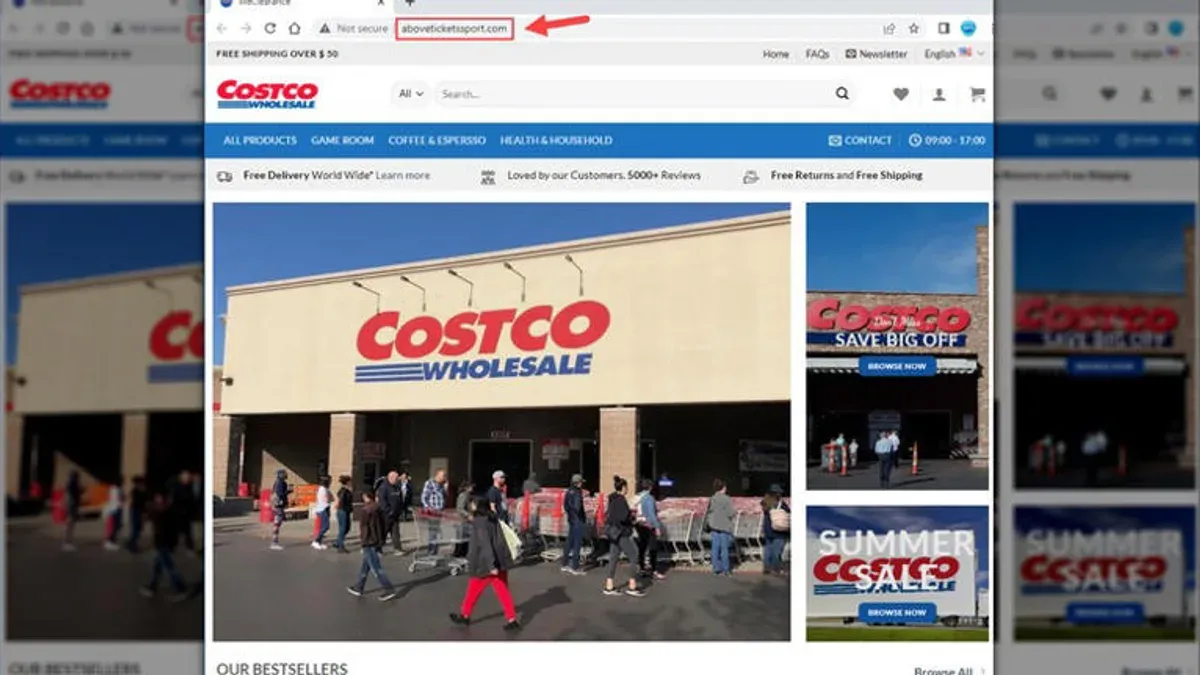
Another misconception is that Costco itself is a scam or that the website is frequently compromised. This confusion can arise when users encounter phishing attempts or fake sites impersonating Costco. Official Costco statements and third-party website monitoring services consistently confirm that the legitimate Costco site maintains robust security protocols and that reported breaches are rare and often related to user account security rather than the site itself.
Viral online content about "hacks" involving Costco products—such as creative recipes using Costco’s steak or chicken bake—sometimes fuels misunderstanding about actual cybersecurity issues. These “hacks” refer to consumer tips and have no connection to website or account security. Understanding this distinction helps prevent unnecessary alarm about Costco’s digital safety.
- How to Protect and Recover Your Chime Account from Hacks
- How to Protect and Recover Your ChatGPT Account from Hacks
- How to Protect and Recover Your Cash App Account from Hacks
- How to Protect and Recover Your Coinbase Account After a Hack
Frequently asked questions
What is the costco steak hack?
The "Costco steak hack" commonly refers to strategies shoppers use to get the best deals on steaks at Costco, such as buying larger bulk packages and portioning them at home, or choosing specific cuts that offer better value. It is not related to hacking or cybersecurity but rather a shopping tip shared among customers.
Is costco a scam?
Costco is a legitimate wholesale retailer with a strong reputation. However, scammers sometimes impersonate Costco to trick people through fake websites, emails, or offers. Always verify you are on Costco's official site and avoid sharing personal information without confirming authenticity.
What is wrong with costco website today?
Occasional issues with the Costco website can include slow loading times, temporary outages, or difficulties logging in. These problems may be due to high traffic, maintenance, or technical glitches, and they typically resolve after some time. Checking your internet connection and clearing browser cache can help.
Is there a fake costco website?
Yes, fake Costco websites exist and often mimic the official site to steal personal or payment information. Look for subtle URL differences, poor design quality, unusual payment methods, or requests for unnecessary personal details. Always access Costco by typing its official domain directly or using a trusted bookmark.
Is costco having trouble with their website?
Costco's website can experience intermittent technical difficulties, especially during sales events or updates. If you encounter problems, try refreshing the page, using a different browser, or visiting at a later time. For ongoing issues, Costco customer service can provide updates and assistance.
Limits of this guide and when to seek professional help
This guide does not cover advanced forensic investigation or legal recourse for identity theft, which requires professional assistance such as contacting law enforcement or specialized credit monitoring services. Some security features or processes may change as Costco updates its website and policies, so always check Costco’s official help pages for the latest information.
The single most useful next step is to immediately change your Costco account password using the “Account Settings” menu under "Sign-In & Security." Choose a strong, unique password and enable two-step verification if available. This helps secure your account before taking additional recovery measures or reporting suspicious activity.