How to Protect and Recover Your Coinbase Account After a Hack
Discover how to protect your Coinbase account from hacks and recover access if compromised to safeguard your cryptocurrency assets.

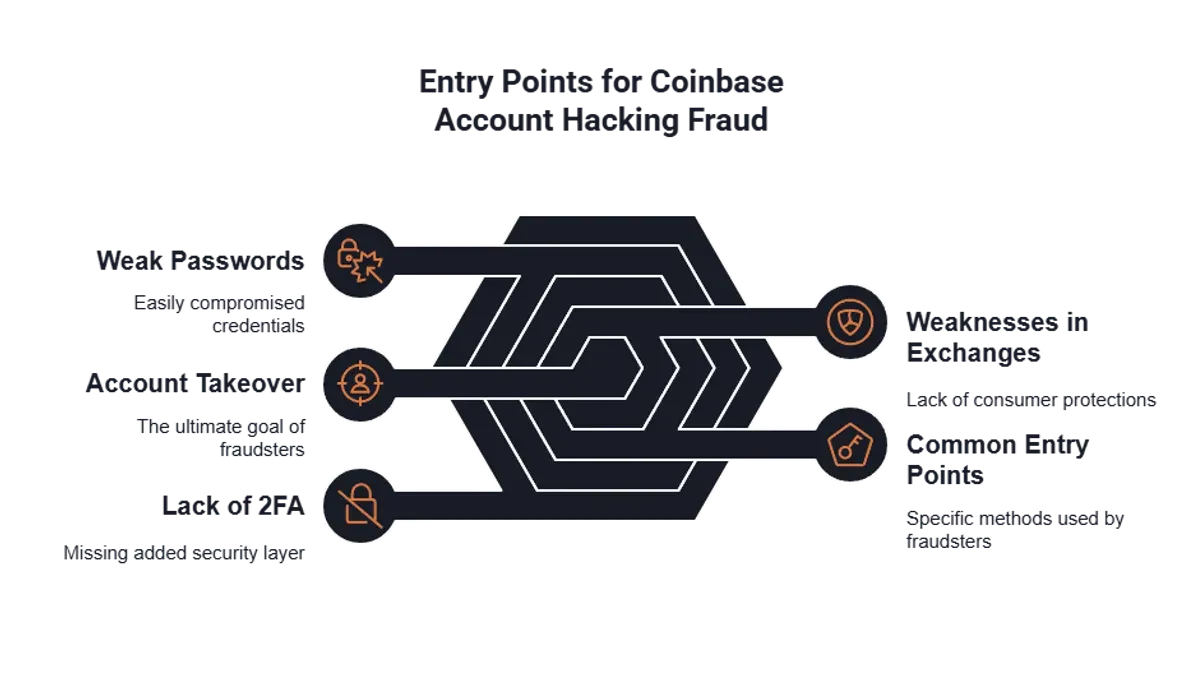
Coinbase Account Hacked: Lock It First, Then Recover and Harden It Through Coinbase's Official Process
A compromised Coinbase account is a race against an irreversible clock. Coinbase states it plainly on its own scam guidance: "Cryptocurrency transactions are irreversible — if you send cryptocurrency to a third party, you cannot reverse it or stop payment." Once the attacker's send leaves your account, no support agent, chargeback or court order inside Coinbase can pull it back. That one fact decides the order of everything in this guide: contain first (lock the account before you investigate), inventory second (know exactly what moved and what the attacker changed), report third (Coinbase's own reporting order, then law enforcement), and only then recovery and hardening. Reading about how hacks happen can wait; the first ten minutes cannot.
This guide follows Coinbase's documented processes as published in its Help Center — the Security Lock, the compromised-account unlock, the account recovery flow for lost email or 2-step access, and the one reimbursement programme that actually exists (Coinbase One Account Protection). Where Coinbase does not publish a number — for example, how long a compromise investigation takes — this guide says so instead of inventing one.
Last updated: November 2026. Steps, waits and feature names checked against Coinbase's own Help Center (help.coinbase.com) as of November 2026, including "Lock or unlock your compromised account", "Account recovery for lost email or 2-step verification access", "Report an unauthorized transaction" and "Account Protection Overview". Applies to personal Coinbase.com and Coinbase app accounts. Coinbase Exchange, Prime and Coinbase Wallet (self-custody) work differently where noted. Written and reviewed by the RolloutReady editorial team.
Minute zero: lock the account before you do anything else
Do not start by reading transaction history, and do not start by changing your password. Start by stopping the bleeding.
If you can still sign in, use Coinbase's Security Lock — it takes under a minute:
- Coinbase app: open the menu → Account & settings → Security → Lock Account, review the details and confirm.
- Browser: sign in, go to accounts.coinbase.com/security → Security → Lock Account, and confirm.
Locking signs the account out of all devices — yours and the attacker's — and disables trading, sending, receiving and account changes. While locked, you can still sign in, view your balance, review transactions and account activity, and contact support: everything you need for the rest of this guide, and nothing the attacker needs.
If you cannot sign in at all — the password, email or 2-step method no longer works — locking from inside is not available to you. Go straight to Coinbase Support: message support from the Help Center, or call the phone number Coinbase publishes on its compromised-account help page for your region (USA/Canada: +1 (888) 908-7930, toll-free, 24/7; a local number, +1 (844) 613-1499, is also listed). Reach that page by typing help.coinbase.com yourself — never by tapping a number in a text message, an ad or a search result someone sent you. Tell support the account is compromised and ask for it to be locked; then work the locked-out recovery section below.
In parallel, secure the email account registered with Coinbase. Your mailbox is the reset hub for this account: password resets, device confirmations and security alerts all land there. On a device you trust, change the email account's password to a new unique one and turn on its own 2-step verification. If the attacker is in your mailbox, every Coinbase fix you make can be quietly undone from there.
If money is moving on the bank side — unauthorised debits from a linked bank account, or charges you don't recognise on your bank or Coinbase statement — Coinbase's own instruction is to report unauthorized transactions on your bank or Coinbase account/statement immediately: call your bank as well as Coinbase. A bank can stop or dispute bank-side debits in ways that have no equivalent for crypto sends, so this call is worth making in the first hour, not the first week.
Minute-zero checklist:
Triage: four states that all look like "hacked"
What you do next depends on which of these you are actually in. Find your row:
| What you see | What it usually means | The right route |
|---|---|---|
| You can sign in, but there are trades, sends or settings you don't recognise | The attacker has (or had) working access; they may still have a session, an API key or your 2-step method | Lock (done above), then the damage inventory and reporting sections |
| A banner says Coinbase locked your account: "We detected suspicious activity on your account" | Coinbase's systems flagged the account — possibly because of the attacker's activity. All other devices have been signed out and transfers disabled to protect your funds | The unlock flow below (identity verification), then inventory, reporting, eviction and hardening — a Coinbase-initiated lock is containment, not resolution |
| Sign-in fails, but your email and password still work and only the 2-step step fails (lost phone, authenticator gone, number changed) | You are locked out of the second factor, not necessarily hacked — but treat it as compromise until the inventory proves otherwise | Account recovery (ID upload) in the locked-out section |
| Sign-in fails completely: password rejected, reset emails never arrive, 2-step offers a method you don't recognise | Assume full takeover: the attacker changed the password and possibly the email or 2-step method | Contact Coinbase Support (message or the published phone number) to lock and flag the account, then account recovery |
Two distinctions worth holding onto. First, a lock is not an eviction: Coinbase locking your account, or you locking it yourself, stops movement but changes nothing about how the attacker got in. Second, being locked out is not proof of a hack — a lost phone produces the same symptom. The recovery route is similar either way; the eviction and hardening steps are what differ, and after an unexplained lockout you should run them anyway.
The damage inventory: what moved, and what did the attacker change?
Work this while the account is locked, and write everything down — timestamps, amounts, addresses and transaction IDs. This record is what Coinbase Support, law enforcement and (if you have it) a Coinbase One Account Protection claim will each ask for. Take screenshots as well as notes; account pages can change as recovery proceeds.
Money movement — in your transaction history:
- Every send you don't recognise: asset, amount, destination address, date/time, transaction (hash) ID. A send that is still pending may be cancellable; a completed send cannot be reversed by anyone — record it for the report, don't chase it.
- Every trade or conversion you don't recognise (attackers often convert everything into one asset before sending it out).
- Every withdrawal to a bank account and every deposit you don't recognise — including a new bank account or payment method you never added.
- Recurring buys: check none were created or altered in your name (Coinbase's reporting guidance starts with exactly this check, along with confirming a charge isn't a reversal requiring payment).
Access and settings — in your security and account settings:
- Sign-in and account activity: sessions, devices or locations you don't recognise, and when they occurred. Note the earliest suspicious sign-in — it dates the compromise.
- Email address, phone number and 2-step method on the account: are they still yours? A changed 2-step method or phone number is the attacker's persistence mechanism.
- API keys (Settings → API): every key listed, when it was created, and its permissions. An API key you didn't create — especially one with transfer/withdrawal permission — is a standing back door that works without your password. You will delete these in the eviction step; for now, record them.
- Address book entries: any saved external address you didn't add. (On the retail Coinbase account an address-book entry alone cannot restrict or enable withdrawals, but an attacker's saved address is evidence of where funds were headed — and on Coinbase Exchange, address whitelisting makes this check critical.)
- Payment methods: cards and bank accounts listed. Note any you don't recognise, and any of yours that were used.
Damage inventory checklist:
Report it: Coinbase's order, then law enforcement
With the account locked and the inventory written, report in this order.
1. Coinbase, using its own reporting sequence. Coinbase's "Report an unauthorized transaction" guidance is five steps, and the order matters:
- Verify the transaction isn't from a recurring buy.
- Confirm it isn't a charge reversal requiring payment to Coinbase.
- Make sure your account is secure (locked — done; eviction comes later).
- Gather transaction details from your bank account or Coinbase statement (your inventory).
- Contact the Coinbase Support team and report the unauthorised transactions, with the details from step 4.
2. Law enforcement — immediately, per Coinbase's own advice. Coinbase's reporting page instructs: "Contact local authorities immediately if an unrecognized third-party has removed funds from your account. Coinbase works with authorities during their investigation." File the police report even if the amount feels small or the outcome uncertain. In the US, also file with the FBI's Internet Crime Complaint Center (IC3). These two reports are not just civic hygiene: they are required documents if you later file a Coinbase One Account Protection claim, and they timestamp your account of events.
3. If you are a Coinbase One member, check Account Protection before you assume everything is lost. This is the one reimbursement route Coinbase actually documents, and it is narrower than the word "protection" suggests:
| Coinbase One Account Protection | Detail |
|---|---|
| Who is eligible | Coinbase One subscribers in supported regions who use a passkey or security key as their authentication method |
| What it covers | Unauthorised crypto transfers from your Coinbase account by a third party — Coinbase's examples include compromise of your personal device and phishing attacks |
| What it does NOT cover | Transactions you authorised because a third party deceived you (the "support agent talked me into sending it" case), transactions made by mistake, and fraudulent activities; Coinbase states the programme is not insurance |
| Deadline | Claim must be submitted within 45 days of the suspected loss date |
| Documents required | A copy of your police report and a copy of your IC3 report, the date(s) of the suspected loss, and the estimated loss amount in USD |
| The trap | If you disable your passkey/security key, or enable weaker 2-step verification such as SMS, coverage is reduced and Account Protection is deactivated after 14 days |
What Coinbase can and cannot do — the honest table. Much of the anger in these cases comes from expecting bank rules on a system that doesn't run on them:
| Coinbase CAN | Coinbase CANNOT |
|---|---|
| Lock or unlock your account and sign out all devices | Reverse or recall a completed crypto send — transfers are irreversible |
| Run the account recovery / identity verification process to restore your access | Recover funds from a self-custody wallet (Coinbase Wallet/Base app) whose recovery phrase was compromised — nobody can |
| Review reported unauthorised activity and cooperate with law enforcement investigations | Act as your bank for crypto: there is no chargeback mechanism for on-chain transfers |
| Process a reimbursement claim if you are an eligible Coinbase One member under Account Protection | Reimburse credential-compromise losses outside that programme as a matter of policy — if your password and 2-step were defeated, do not budget on getting the crypto back |
| Tell you which settings were changed and when, through your account activity | Shorten the security holds built into recovery and unlocking (the send pauses below are deliberate) |
Reporting checklist:
Locked out entirely: the account recovery process
If you cannot sign in, Coinbase's route is account recovery: proving you are the account owner with government ID, then rebuilding your access. There are two shapes of it.
Lost email access or lost 2-step method (you still know your password):
- Go to Coinbase's account recovery page and enter your email address and password as usual. (Lost the password too, or never set one? Reset the password first, then start recovery.)
- Choose a recovery option:
- Upload your ID to sign in — you capture your ID document (and, if required, a selfie) with a camera; on a device without a camera you'll get a QR code to continue on your phone. Coinbase says this process takes up to 24 hours, and you may be unable to send funds for 24 hours after it completes.
- Request trusted contacts approval (only if you enabled trusted contacts beforehand). Note its limits, in Coinbase's own description: it does not let you update your email address or 2-step verification method afterwards, and it deletes any previously added payment methods.
- Once you are verified and signed in, update your 2-step verification method within 24 hours to keep your account access. Treat this as part of the recovery, not an optional follow-up: set up a passkey or security key (see hardening), not the method that just failed you.
If you are still signed in somewhere but have lost your 2-step method, the same flow starts from the 2-step verification settings page: Lost access to your 2-step verification? → Get started, enter your password, and complete the identity verification.
The full recovery timeline (identity verification after a lockout). Coinbase's account-access guidance gives the shape of the full process: it usually takes 48 hours to complete, though it can take longer. After 24 hours you should be able to sign in and complete buys and sells; after 48 hours full trading capability is restored. Sends stay disabled until the full security period has passed — if you sign in mid-period you'll get a pop-up saying sends are temporarily disabled. That hold is the system working for you: it is the window in which an attacker who somehow kept a foothold cannot immediately empty the account again.
Related waits, so nothing surprises you: changing the phone number on an account runs through a recovery process Coinbase puts at 48–72 hours; and if your account ends up formally restricted (a different state from locked — see the FAQ), Coinbase says restriction resolution and response review typically takes up to 10 business days, sometimes longer.
What happens to your money during recovery? Your balances stay in the account — recovery changes who can sign in, not where the assets are. Trading, sending, receiving and account changes are paused while the account is locked, and sends remain paused for the security period after you get back in. During a formal account review, Coinbase notes some activity may remain available depending on the asset, and cash can generally be withdrawn to a verified bank account — but the restriction's reason can change that, so treat any mid-review movement as a bonus, not a plan. Nothing about the recovery process itself moves or sells your crypto.
Locked-out recovery checklist:
Unlocking, and the eviction: getting the attacker out for good
When access comes back — by unlocking a locked account or completing recovery — do not resume normal use. An unlock returns the account to whoever holds the credentials and settings as they now stand; if the attacker's API key, phone number or 2-step method is still on the account, you have unlocked it for both of you.
Unlocking a Security Lock (Coinbase's documented flow): sign in, enter your email and password, complete 2-step verification, select Unlock account and follow the prompts. What happens next depends on how the lock was set: if you locked it from the same device, resetting your password regains access immediately; if you locked it from a different device, or Coinbase locked it, you must verify your identity. When it completes you'll see "Account secured and unlocked". Two built-in consequences: you will need to reset your password, and crypto sends are paused for 24 hours after unlocking.
The eviction sequence — in order, in one sitting:
- Set the new password properly. Unlocking requires a reset anyway; make it count. Coinbase's minimum is 8 characters with uppercase and lowercase letters, at least one number and at least one symbol — treat that as the floor, not the target. Use a password manager to generate a long, random password used on no other site. If the old password was reused anywhere (especially your email), change those too — email first.
- Replace the 2-step verification method — do not just re-enable the old one. If the attacker defeated SMS or your authenticator, that method is burnt. In your security settings, set up a passkey or a security key (Coinbase supports U2F security keys), and keep a second strong method as backup: Coinbase's own recommended setups are two security keys, or passkey + security key, or passkey + push notification. Any TOTP authenticator app works (Google Authenticator, Duo, Microsoft Authenticator — note that Authy is no longer supported). SMS is the default but Coinbase itself calls it the least secure option; after a SIM-swap-style attack it should not be your primary method at all. Coinbase cannot remove 2-step verification entirely — you will always have at least one method, so make it a strong one.
- Delete every API key you didn't create — and any you don't actively need. Settings → API lists your keys. Deleting/revoking a key disables it immediately. A key with transfer permission operates without your password or an interactive sign-in, which is precisely why attackers create them: the password change that locked you out of nothing leaves their key working. If you legitimately use API keys (tax software, trading bots), delete them all anyway and re-create fresh ones with only the permissions the tool needs; rotate on a schedule afterwards.
- Review payment methods. Remove any card or bank account you don't recognise, and re-check the ones that are yours against your bank statements for the compromise window. Remember the trusted-contacts recovery route deletes saved payment methods for you — if you came back that way, you'll be re-adding yours from scratch, which is a feature: re-add only what you intend to keep.
- Confirm the account email and phone number are yours. If either was changed, change it back and expect the security holds that come with contact-detail changes. Then re-run the Minute-zero email check: your mailbox is still the reset hub, and its password and 2-step are part of this account's security whether Coinbase says so or not.
Eviction checklist:
Hardening: make the next attack fail
With the attacker evicted, set the account up so that a stolen password alone is no longer enough. These are Coinbase's own current features, in the order they pay off:
1. Keep the passkey/security key as your primary sign-in protection. Beyond blocking phishing (a passkey won't work on a lookalike domain), it is also the eligibility key for Coinbase One Account Protection: coverage requires a passkey or security key, and downgrading to SMS starts a 14-day countdown to losing that coverage.
2. Turn on Transfer protection — the withdrawal brake Coinbase actually offers retail accounts. In Account Security Settings (next to the 2-step verification settings), Transfer protection lets you put a time delay of 6–48 hours on outbound transactions — crypto sends and cash withdrawals — and/or require an extra verification before they execute. Set the daily threshold to $0 so it applies to every transfer, not just large ones. Verification can be done by passkey, security key, authenticator app or push notification, or by trusted contacts: people you designate who approve or reject a transaction through an email link and a code you share with them. A protected transaction shows as "pending approvals" / "delayed", and can be cancelled from the transaction details screen before it completes — that cancellation window is the whole point. Coinbase also notifies you by email, SMS and push at every step, including a link to lock the account. And the settings protect themselves: reducing a 48-hour delay to 24 hours takes effect only after 48 hours, and changing trusted contacts requires the existing contacts' consensus — an attacker inside your account cannot quietly switch the brake off.
3. Move long-term holdings into a Vault. A Coinbase vault is a separate balance for an asset with a two-stage exit: a withdrawal must be approved via email links by the designated approvers (for a standard vault, confirmations go to your inbox and your secondary email; group vaults can require 2, 3 or 5 approvers, with at least two approvals needed), and an unapproved withdrawal is automatically cancelled after 24 hours. Once approvals are complete, a 48-hour waiting period runs before the funds move — and Coinbase Support cannot bypass the waiting period for anyone. That combination — another inbox (or another person) approving, plus two days to notice — is the strongest delay Coinbase offers on stored crypto. Note the commitment: a vault's withdrawal delay, notification and security settings cannot be changed after creation, so set them deliberately.
4. Know what does NOT exist on a retail account: withdrawal address allowlisting. If you read elsewhere that Coinbase lets you restrict withdrawals to pre-approved addresses, that feature — Address Book whitelisting, with a 48-hour hold on newly added addresses — exists on Coinbase Exchange (and stricter versions on Prime), and Coinbase's own help text states the Exchange address book and whitelisting are not accessible through Coinbase.com or the Coinbase app. For a retail account, Transfer protection (delay + approval + cancellation window) and vaults are the equivalent defences; don't waste time hunting settings for a toggle your account type doesn't have. If you actively trade on Exchange, enable whitelisting there.
5. Finish the perimeter. Check your Coinbase One subscription status if you use it (Account Protection depends on it staying active with the passkey/security key in place). Keep security alerts on and actually read device-confirmation emails — Coinbase's own guidance for an unexpected device confirmation is to change your Coinbase and email passwords and open a support ticket if you see a sign-in you don't recognise. And keep a written record of your setup (which 2-step methods, which trusted contacts, which vaults) somewhere offline: in the next incident, that page is your inventory starting point.
Hardening checklist:
The scam that follows the hack
A compromised Coinbase account has a second act, and it targets you while you are frightened and in a hurry. Coinbase's impersonation guidance is unusually blunt, so here it is in its own terms:
- Coinbase will never call or text you to move your funds. "We will never call or text you to give you a new seed phrase or wallet address to move your funds to. If you receive this call, hang up the phone." Real Coinbase agents will never ask you to secure, move or access your funds; never provide a wallet seed phrase or ask for yours; and never ask for your password or 2-step verification code. Scammers spoof legitimate phone numbers, so the caller ID proves nothing.
- Coinbase does not sell "account insurance" or recovery services. Coinbase states it does not offer insurance products and will never call or SMS you to request account access. Anyone offering to recover your crypto for a fee — a "recovery agent", a social-media account, a hacker-for-hire — is promising something the technology makes impossible for completed transfers. At best they take the fee; at worst they take the rest of the account.
- The only phone numbers are the ones Coinbase publishes. Fake support lines are spammed across search results, forums and ads precisely so panicking users find them first. Coinbase's instruction: only contact them via the phone number listed on their homepage or help center, reached by typing the address yourself. Found a suspicious "Coinbase" email, text or call? Coinbase asks you to forward the details to [email protected].
- Your Coinbase.com account has no seed phrase. The custodial account this guide is about is protected by a password and 2-step verification — there is no 12-word phrase for it, so anyone asking for "your Coinbase seed phrase" in connection with this account is lying by definition. The phrase belongs to Coinbase Wallet / the Base app (self-custody), where you — not Coinbase — hold the keys. Keep the two straight, because the honest version is harsh: if a self-custody wallet's recovery phrase is compromised, no one can recover those funds, Coinbase included. The correct response there is different: from a clean device, create a new wallet and move whatever remains to it immediately, before the person holding your phrase does.
Spot-the-scam checklist:
Keep the records: statements are your evidence and your tax file
One short, unglamorous step that pays off twice. From Coinbase's Statements page you can download monthly statements (HTML, PDF or CSV) and generate custom statements filtered by asset, transaction type and date range. Download the full record of the compromise window now and store it with your inventory and police report: it is the cleanest evidence set for Coinbase Support, law enforcement and any Account Protection claim, and it cannot be reconstructed as easily later. The same records feed your taxes — theft does not erase the tax history of the trades involved; US customers will find gain/loss reports and forms (including Form 1099-DA from the 2025 tax year) under Coinbase Taxes → Documents. This guide is not tax advice; it is a reminder that the download takes two minutes today and may be genuinely hard to assemble next April.
Verification: before you call this account safe again
Run this pass a day or two after the eviction (the gap matters: it lets delayed alerts and pending changes surface), and once more a week later. The account is safe when every line holds — not when you can merely sign in.
Verification checklist:
Pitfalls
| Pitfall | What actually happens | The fix |
|---|---|---|
| Investigating before locking | Every minute spent reading transaction history is a minute the attacker can still send; completed sends cannot be reversed | Security Lock first (one minute), inventory second |
| Changing only the password | The attacker returns through their added API key, changed phone number or 2-step method — none of which a password change touches | Run the full eviction sequence: password, 2-step rebuild, API keys, payment methods, contact details |
| "Moving funds to safety" on a caller's instruction | The caller is the scam's second act: Coinbase will never call or text you to move funds or give you a new address or seed phrase | Hang up. Only use contact routes you reached by typing coinbase.com / help.coinbase.com yourself |
| Waiting to report because the amount "might come back" | Pending sends clear, the trail cools, and the Coinbase One Account Protection 45-day claim window keeps running | Report to Coinbase and law enforcement immediately; file first, hope second |
| Re-enabling SMS as the main 2-step method after a SIM-swap-style attack | The same carrier-level trick works again; Coinbase calls SMS its least secure option — and SMS downgrade also deactivates Coinbase One Account Protection after 14 days | Passkey or security key as primary; a second strong method as backup |
| Assuming a Coinbase lock means the incident is over | A lock pauses movement; it changes nothing about how the attacker got in, and unlocking restores access to whoever holds valid credentials/settings | Treat unlock as the start of eviction, not the end of the incident |
| Hunting for withdrawal allowlisting on a retail account | The toggle doesn't exist on Coinbase.com/the app (it's an Exchange/Prime feature), so the real protections go unconfigured meanwhile | Use Transfer protection (delay + approval + cancel window) and vaults on retail; enable whitelisting on Exchange if you trade there |
| Treating Coinbase Wallet like the Coinbase account | The self-custody wallet has no Coinbase-side recovery at all: a compromised recovery phrase means the funds are anyone's to take | Create a new wallet from a clean device and move remaining funds immediately; never enter the old phrase anywhere "support" suggests |
FAQ
Can Coinbase reverse a send or get my crypto back?
No. Coinbase states it directly: cryptocurrency transactions are irreversible, and a send to a third party cannot be reversed or stopped once made. What Coinbase can do is lock and restore your account, review what happened, and cooperate with law enforcement. The one exception to "the money is simply gone" is not a reversal at all: if you are an eligible Coinbase One member using a passkey or security key, Account Protection may reimburse an unauthorised withdrawal up to your coverage limit — claim within 45 days, with a police report and IC3 report attached.
Will Coinbase ever call me about my account?
Not like that. Coinbase: "We will never call or text you to give you a new seed phrase or wallet address to move your funds to." Its agents will never ask for your password or 2-step code, never ask you to move or "secure" funds, and Coinbase does not offer insurance products by phone or SMS. Scammers spoof real phone numbers, so treat any inbound "Coinbase" call as hostile until you have hung up and contacted Coinbase through the number on its own site.
How long does recovery actually take?
It depends which process you are in, and Coinbase publishes figures for each: ID-upload recovery for lost email/2-step access takes up to 24 hours (sends unavailable for 24 hours after). Full account recovery after a lockout usually takes 48 hours — sign-in and buys/sells typically return after 24 hours, full trading after 48, with sends held until the security period ends. Unlocking a Security Lock requires a password reset (immediate if you locked it from the same device) or identity verification, and sends pause for 24 hours after unlocking. A formal account restriction review typically takes up to 10 business days. What Coinbase does not publish is a timeline for investigating a compromise itself — anyone quoting you one is guessing.
What's the difference between being hacked and being locked out?
A lockout is a symptom; a hack is one of its causes. You can be locked out with no attacker involved (lost phone, lost authenticator), and you can be thoroughly hacked while still able to sign in (the attacker prefers it that way). The recovery mechanics — ID verification, security holds — are similar, which is why this guide routes both through them. The difference is what you do after: a pure lockout needs the new 2-step method set within 24 hours; a hack additionally needs the full eviction and hardening, because something in the account was changed by someone else.
I sent crypto to someone who turned out to be a scammer. Is that a "hack" Coinbase will cover?
No — and the distinction matters. If you were deceived into authorising the transfer yourself, Coinbase One Account Protection explicitly excludes it ("transactions you authorized as a result of being deceived by a third party"), and the send itself is irreversible. Report it anyway — to Coinbase, to law enforcement and via IC3 — because reports are how scam addresses get flagged for the next person. But do not let anyone sell you a "recovery" for it.
Quick checklist
References
- Coinbase Help: Lock or unlock your compromised account — Security Lock steps (app and web), what stays available while locked, the unlock flow, the post-unlock password reset and the 24-hour send pause; also the source of the published support phone numbers. https://help.coinbase.com/en/coinbase/privacy-and-security/account-compromised/my-account-was-compromised
- Coinbase Help: Report an unauthorized transaction — the five-step reporting order, and the instruction to contact local authorities immediately. https://help.coinbase.com/en/coinbase/privacy-and-security/account-compromised/how-do-i-report-an-unauthorized-transaction
- Coinbase Help: Account recovery for lost email or 2-step verification access — ID-upload sign-in (up to 24 hours), the trusted-contacts option and its limits, and updating your 2-step method within 24 hours. https://help.coinbase.com/en/coinbase/managing-my-account/get-back-into-my-account/account-recovery-lost-email-2step-verification
- Coinbase Help: Accessing your account — the full recovery timeline: usually 48 hours, sign-in and buys/sells after 24 hours, sends disabled until the security period passes. https://help.coinbase.com/en/pro/managing-my-account/account-recovery/account-recovery-faq
- Coinbase Help: Set up your 2-step verification — the available methods (security key, passkey, authenticator app, push notification, SMS) and Coinbase's recommended combinations. https://help.coinbase.com/en/coinbase/getting-started/getting-started-with-coinbase/2-step-verification
- Coinbase Help: Transfer protection — 6–48-hour delays on sends and cash withdrawals, daily thresholds, trusted-contacts verification, and cancelling a protected transaction before it completes. https://help.coinbase.com/en/coinbase/trading-and-funding/sending-or-receiving-cryptocurrency/transfer-protection
- Coinbase Help: Vaults and Why is my vault withdrawal pending? — approver emails, the 24-hour unapproved-withdrawal cancellation, the 48-hour waiting period, and that support cannot bypass it. https://help.coinbase.com/en/coinbase/getting-started/other/vaults-faq
- Coinbase Help: Account Protection Overview — Coinbase One reimbursement for unauthorised withdrawals: passkey/security-key eligibility, exclusions, the 45-day claim window, police report + IC3 requirements. https://help.coinbase.com/en/account-protection-overview
- Coinbase Help: Technical support and impersonation scams — "We will never call or text you to give you a new seed phrase or wallet address to move your funds to", what agents will never ask, and reporting phishing to [email protected]. https://help.coinbase.com/en-gb/coinbase/privacy-and-security/avoid-scams/tech-support-scams
- Coinbase Help: Avoiding cryptocurrency scams — "Cryptocurrency transactions are irreversible", fake support lines, and that Coinbase does not run giveaways. https://help.coinbase.com/en/pro/privacy-and-security/avoiding-phishing-and-scams/avoiding-cryptocurrency-scams
- Coinbase Help: Address book and crypto withdrawal address whitelisting — whitelisting exists on Coinbase Exchange (48-hour hold on new addresses) and is not accessible through Coinbase.com or the app. https://help.coinbase.com/en/exchange/managing-my-account/address-book-and-crypto-withdrawal-address-whitelisting
- Coinbase Help: Account statements and gain/loss reports — downloading monthly statements (HTML/PDF/CSV) and generating custom statements. https://help.coinbase.com/en/coinbase/taxes/tools/statements
Read next
- Microsoft Account Hacked: How to Recover It Through Microsoft's Official Path — the same incident discipline on the account that usually guards the email inbox: triage first, the official recovery form done properly, the 30-day security-info wait, and a full eviction checklist. If the password your attacker used here was reused there, read this one next.
- How to Recover and Secure a Hacked Outlook Account — your mailbox is the reset hub for Coinbase and almost everything else; this is the mailbox half of the incident, in depth.
- How to Recognize and Secure a Hacked OneDrive Account — a stolen password rarely stops at one account; check the file-storage account that shares your Microsoft sign-in before the attacker does.