How to Secure and Recover a Plenty of Fish Account After a Hack
This guide explains how to recover and secure a Plenty of Fish account hacked through phishing, reused passwords, or scams.

This article explains how to secure and recover a Plenty of Fish account after a hack, addressing platform-specific challenges and common scam tactics. Plenty of Fish account hacked scenarios often stem from reused passwords, phishing attempts, or security lapses within the app. Users frequently confuse a hacked account with temporary site outages or scams impersonating the platform, which complicates timely recovery. This guide clarifies how to safely delete compromised accounts, recover access, and strengthen security settings unique to Plenty of Fish. Practical steps focus on navigating account menus, recognizing suspicious activity, and avoiding common mistakes during recovery.
Why is my Plenty of Fish account hacked?
Plenty of Fish accounts often get hacked due to weak or reused passwords. Many users recycle passwords across multiple sites, increasing vulnerability if another service suffers a data breach. For example, if the same password was used on a less secure site that leaked credentials, hackers can try those details on Plenty of Fish.
Phishing attempts specifically target Plenty of Fish users by sending fake messages claiming to be from the platform. These messages often include links to fraudulent login pages designed to steal credentials. Scammers may pose as support staff or potential matches to trick users into revealing their passwords.
Account compromises can also result from third-party data breaches linked to services connected to Plenty of Fish accounts. If a linked email or social media account is breached, that can lead to unauthorized Plenty of Fish access. Additionally, some users fall victim to fake profiles that engage them in conversation to extract sensitive information or login details.
Technical vulnerabilities within the platform itself are rare but can occur, while user errors such as failing to log out on shared devices or clicking unsafe links significantly increase risk. For example, logging in on a public computer without signing out can expose an account to takeover.
Is Plenty of Fish a scam or is the website down?
Plenty of Fish (POF) is a legitimate dating platform with millions of active users worldwide. It is owned by Match Group, a well-established company that operates multiple reputable dating services. Reports of scams often stem from fake profiles or phishing attempts targeting users, not from the platform itself.
Temporary website downtime can occur due to server maintenance, upgrades, or unexpected technical issues. These outages are usually brief and communicated through official POF channels like their Twitter account or status page. For instance, a scheduled maintenance might take the site offline for a few hours, causing login failures or slow loading times.
User reports warning about scams should be viewed as cautionary signals rather than evidence of the entire platform being compromised. Scam profiles can appear on any dating site, and POF actively removes reported fake accounts. Verifying official announcements and checking credible outage tracking websites helps distinguish between genuine platform problems and isolated user scams.
Tip: Before assuming a scam or outage, check POF’s official social media or trusted outage monitoring services to confirm site status.
How to delete a Plenty of Fish account safely
To permanently delete a Plenty of Fish account, users must access the account settings through the website or mobile app. On the website, navigate to "Profile Settings" by clicking the profile icon, then select "Privacy Settings". Scroll down to find the "Delete Account" option and follow the prompts, which include confirming the password and a reason for leaving.
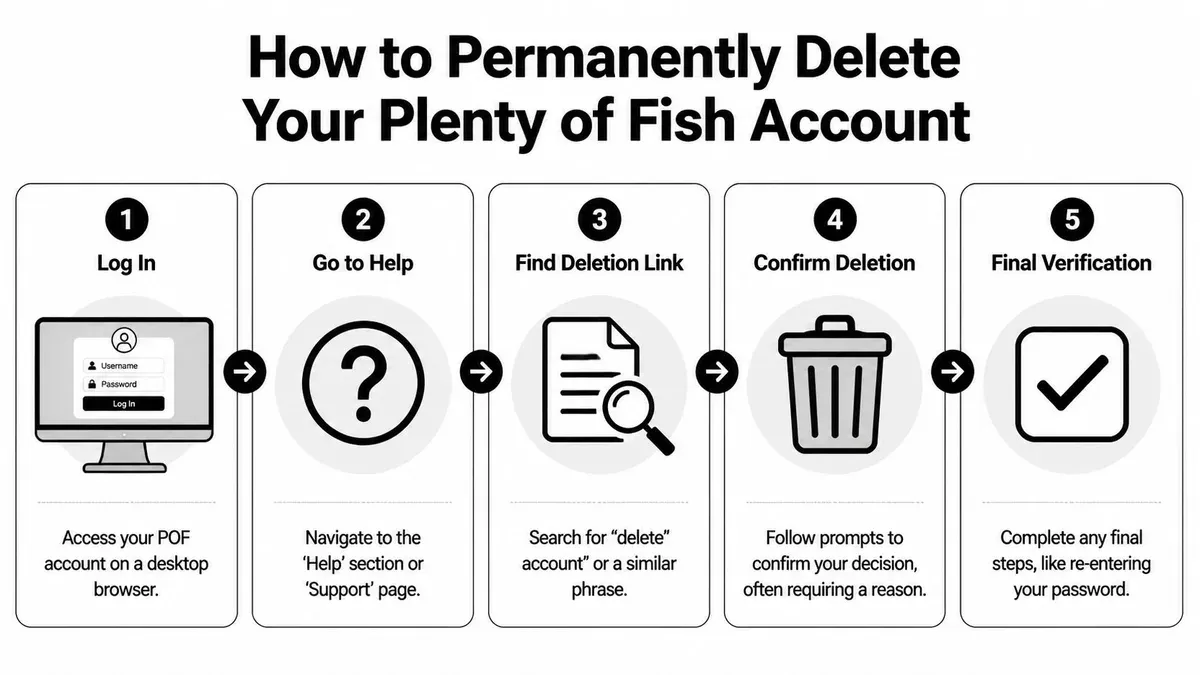
In the mobile app, tap the menu icon, go to "Settings," then "Account," and select "Delete Account." The app will request password confirmation and a reason before proceeding. After submission, Plenty of Fish typically processes the deletion immediately, but it may take up to 24 hours to fully remove all user data from servers.
Account deletion is permanent and differs from deactivation, which only hides the profile temporarily without removing data. Users often confuse the two and expect data to be erased after deactivation. Another common issue is not completing all confirmation steps, leaving the account active. If deletion fails, clearing browser cache or updating the app can resolve glitches.
For example, a user deleting their account via the website might miss the final confirmation page, thinking the process completed. This leaves the account active and vulnerable. Carefully completing each step ensures proper deletion and data removal.
How to recover a hacked Plenty of Fish account
Upon noticing unusual activity or being locked out, immediately attempt a password reset. Navigate to the Plenty of Fish login page, click "Forgot Password?", and enter the registered email address. A reset link will be sent—check spam folders if it doesn't arrive promptly. Resetting the password blocks further unauthorized access using the old credentials.
If password reset fails or the email on the account has been changed, contact Plenty of Fish support directly via their Help Center. Provide the account username, original email, approximate creation date, and details of suspicious activity. Response times vary but generally expect a reply within a few days. Successful recovery often hinges on supplying accurate verification details.
After regaining access, immediately update the password to a strong, unique one and enable any available security features. Review account settings for unauthorized changes such as linked social accounts or profile edits. Logging out of all sessions, if the option exists, helps terminate active unauthorized logins. Users should remain vigilant for phishing attempts and avoid third-party apps requesting Plenty of Fish credentials.
Example: A user noticed messages they didn't send and couldn't log in. They reset the password via email, regained access within hours, then contacted support to confirm no profile data was altered. Changing the password and logging out of all devices prevented further breaches.
How to improve Plenty of Fish account security
Use a strong, unique password that combines letters, numbers, and symbols. Password strength tools like Have I Been Pwned or LastPass Password Generator help create and verify passwords that resist guessing and brute-force attacks. Avoid reusing passwords from other sites, as a breach elsewhere can compromise Plenty of Fish accounts.

Enable two-factor authentication (2FA) if available. While Plenty of Fish does not currently offer native 2FA, linking the account to a verified email address and phone number adds indirect layers of protection through recovery options and notifications.
Be vigilant against phishing and scam profiles. Common tactics include messages urging urgent password resets via suspicious links or profiles requesting money or personal information. Never click links in unsolicited messages; instead, access Plenty of Fish directly through the official website or app.
Regularly review account activity by checking the "Recent Logins" section under account settings. Monitoring login locations and devices can reveal unauthorized access early. Adjust privacy settings by navigating to "Settings" > "Privacy" to control who can view profile details and contact the account holder.
Tip: Turning off "Show me as online" in privacy settings reduces visibility to potential scammers who target active users.
Frequently asked questions
How to get hacks in fish?
Accounts on Plenty of Fish commonly get hacked through phishing scams, weak passwords, or reused credentials from other breached sites. Attackers may also exploit malware on a device or use social engineering to gain access. Avoid clicking suspicious links and regularly update passwords to reduce risk.
How to delete plenty of fish account?
To delete a Plenty of Fish account, log in, go to the Settings menu, then select "Delete Profile" at the bottom of the page. Confirm the deletion by following the on-screen prompts. Note that simply uninstalling the app does not remove the account.
Why my account is hacked?
Accounts are hacked often due to password reuse, phishing attempts, or exposure through data breaches on other services. Insufficient account security measures like two-factor authentication also increase vulnerability. Scammers target dating sites because users share personal information that can be exploited.
Is plenty of fish website down?
Website outages are rare but can occur due to server maintenance or technical issues. If the site appears down, check status pages or social media for official updates before assuming an account problem. Clearing browser cache or trying a different device can help rule out local issues.
Plenty of Fish my account blocked — what to do?
Accounts may be blocked for violating terms like sending spam or offensive messages. Contact Plenty of Fish support through their Help Center to inquire and appeal the block if it seems unwarranted. Avoid creating multiple accounts, as this can trigger automatic restrictions.
What this advice does not cover
This article does not cover advanced forensic account recovery methods or legal actions for identity theft. Users facing severe breaches involving personal details beyond the Plenty of Fish platform, such as social security numbers or financial information, should consult cybersecurity professionals or legal experts. Additionally, incidents involving coordinated scams or repeated unauthorized access may require specialized investigation beyond basic account recovery steps.
For those who simply want to secure their Plenty of Fish account or recover it after a common hack, following the outlined steps is usually sufficient. However, persistent issues or complex compromises often need expert help.
The single most useful next step is to immediately update the account password using a strong, unique combination and enable two-factor authentication if available under Settings > Account Security. This action blocks further unauthorized access and forms the foundation of all other recovery and security measures.
See also: How to Recover and Secure an OkCupid Account After a Hack · How to Identify, Recover, and Secure a Hacked PlayStation Account · How to Recover and Secure a Hacked Outlook Account · How to Recover and Protect a Hacked iCloud Account