Plan and Execute Your Basecamp Implementation Timeline
Learn how to structure accounts, set up communication, and use Basecamp tools to create a successful implementation timeline that fits your project needs.

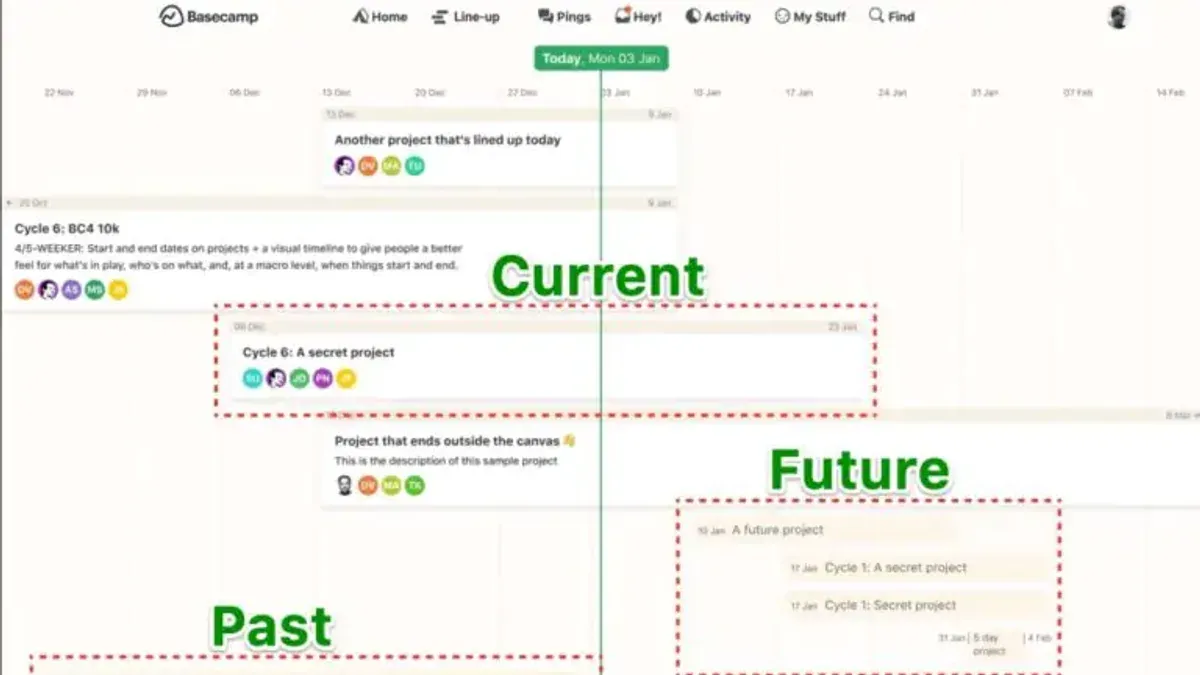
Basecamp 5, the latest major release, offers decades of refined project management features, but its Schedule tab lacks native task dependencies and progress tracking, which often trips up planners expecting traditional Gantt chart functionality. Understanding these limitations upfront shapes realistic timelines and prevents wasted effort.
You will learn how to structure accounts, name projects, set up communication, and use Basecamp’s tools in a way that aligns with your project delivery model and team roles, ensuring your implementation leads to sustained success rather than frustration.
Settings, menu paths and limits here were checked against Basecamp, Project Management Formula, ONES.com Blog (full list at the end) in November 2026.
Decide Your Account Structure Based on Project Delivery Model
Choosing the right Basecamp account structure is critical. You must decide between a single account hosting multiple projects or separate accounts for each project. This choice hinges on your delivery model and how much data isolation you require.
If you manage a single large program with multiple interconnected workstreams, a single Basecamp account with multiple projects is your best option. This approach provides a unified view and centralized management, making it easier to track progress across all streams without switching accounts. For example, a company running a product launch with marketing, development, and support teams can keep all projects under one roof for seamless coordination.
Conversely, if your portfolio consists of multiple independent projects where confidentiality or data isolation is paramount, separate Basecamp accounts per project prevent information leakage. This setup restricts access and visibility strictly to relevant stakeholders, safeguarding sensitive data. Think of a consultancy managing several client projects that must remain entirely separate.
| Your Situation | Recommended Account Setup | Deciding Factor |
|---|---|---|
| Single large program with multiple workstreams | One Basecamp account with multiple projects | Enables unified views and centralized management across workstreams |
| Multiple independent projects requiring strict data isolation | Separate Basecamp accounts for each project | Prevents information leakage between projects |
Access control and project visibility depend on your structure choice. A single account simplifies broad permissions management but risks unintended data exposure if roles aren’t carefully assigned. Separate accounts enforce isolation inherently but require managing multiple logins or billing setups.
- Assess your project interdependencies and data sensitivity.
- Plan permission levels accordingly to balance access and security.
Making this decision early sets the foundation for your Basecamp implementation timeline and avoids costly restructuring later. This decision matrix clarifies the choice based on your delivery model.
Name and Structure Projects for Clear Outcome Focus and Phased Workflows
Name each Basecamp project after a clear, measurable outcome to ensure everyone understands the end goal. For example, use titles like Q3 Marketing Campaign or New Product Launch. This clarity prevents confusion and aligns the team’s efforts.
Within each project, create separate to-do lists that represent distinct phases such as Planning, Execution, and Review. This phased structure segments work logically and allows you to track progress by phase rather than a jumble of unrelated tasks.
For instance, under the Q3 Marketing Campaign project, have to-do lists titled Campaign Strategy (Planning), Content Creation (Execution), and Performance Analysis (Review). This setup maintains focus and accountability, making it easier to identify blockers or delays in a specific phase.
Organizing projects and to-do lists this way avoids the pitfalls of vague project scopes and unclear task grouping. It also supports phased workflows, helping you manage transitions between planning, action, and evaluation smoothly.
- Align to-do list names with the phase’s purpose for clarity.
This approach is effective for all Basecamp plans and platforms and is a foundational step in your timeline setup process. Learn more about outcome-based project naming and phased to-do lists.
Set Up Message Boards to Support Strategic Communication and Accountability
Organize your Basecamp Message Boards into clear categories that mirror your project delivery structure. Typical categories include Governance, Risk & Issues, and Scope Changes. Each category serves a distinct purpose: Governance captures decisions and policy updates; Risk & Issues records potential and actual problems; Scope Changes documents any alterations to project deliverables.
Maintain disciplined posting within these categories to avoid clutter and ensure accountability. For example, a post in Governance might detail the approval of a new project protocol, while Risk & Issues could contain updates on a supplier delay and mitigation steps. Scope Changes posts clarify adjustments in client requirements with documented dates and responsible parties.
Message Boards act as your central hub for strategic communication. They keep all stakeholders aligned by providing a single source of truth for decisions, risks, and accountability. Without strict category discipline, information overlaps and confusion can quickly undermine project clarity.
Establish these categories early in your Basecamp setup. Encourage team members to post only in the relevant category and to title posts clearly. This approach prevents information overload and makes it easier to track project progress and issues over time.
For example, a post titled "Risk: Delay in component delivery impacting Phase 2" under Risk & Issues immediately signals its content and urgency. This clarity helps you manage communications proactively and maintain control over project outcomes.
Learn more about organizing Basecamp Message Boards strategically.
Use Basecamp Tools to Track Tasks, Conversations, and Timelines Effectively
Basecamp provides a suite of core features that work together to keep your projects on track. Start with To-dos, which serve as your primary task trackers. Each to-do must be assigned to one person only; if a task requires multiple contributors, split it into separate to-dos. Assign due dates to enforce accountability and clarity. For visualizing workflows, Card Tables offer a Kanban-style board where you can move cards across columns representing different stages, helping you monitor progress at a glance.
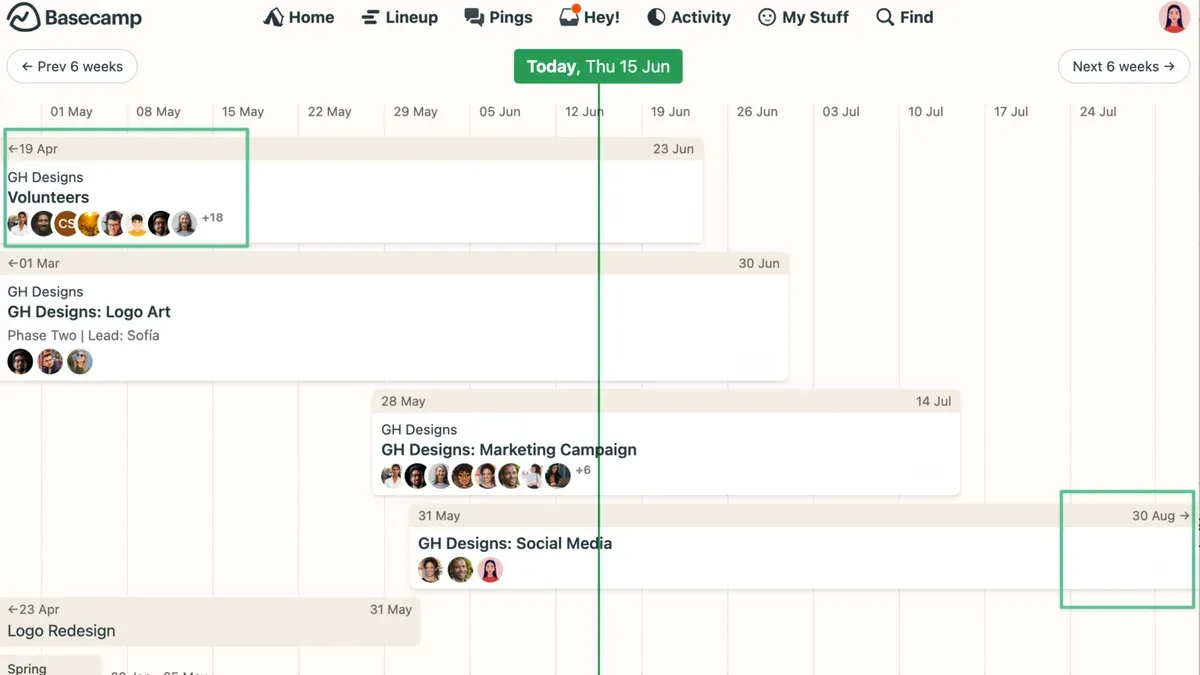
Real-time communication happens through Chats & Pings. Use group chats for broad discussions and direct Pings for quick one-on-one messages, keeping conversations outside of task comments to reduce noise. The Schedule tab provides a timeline view similar to a Gantt chart, showing tasks as horizontal bars by their start and due dates. However, it lacks dependencies and progress shading, so it won’t automatically adjust dates if tasks slip or link tasks in sequence.
Docs & Files act as centralized storage for all project assets, ensuring everyone accesses the latest documents. Finally, Reports & Automatic Check-ins automate status updates and progress tracking, reducing manual follow-ups and keeping the team aligned.
| Tool | Purpose | Role in Timeline Workflow |
|---|---|---|
| To-dos | Task tracking with single assignees and due dates | Defines individual work items and deadlines |
| Card Tables | Kanban-style workflow visualization | Visualizes task progression through phases |
| Chats & Pings | Real-time group and direct messaging | Facilitates immediate communication apart from tasks |
| Schedule | Timeline view of tasks and events | Shows project timing without dependencies |
| Docs & Files | Project asset storage | Keeps documents accessible and organized |
| Reports & Automatic Check-ins | Automated status updates | Keeps the team informed on progress |
Store technical specs in Docs & Files, and automate daily check-ins to monitor progress without extra meetings. This combination keeps your project transparent, accountable, and moving forward efficiently.
Understand the Limitations of Basecamp’s Timeline and Task Management
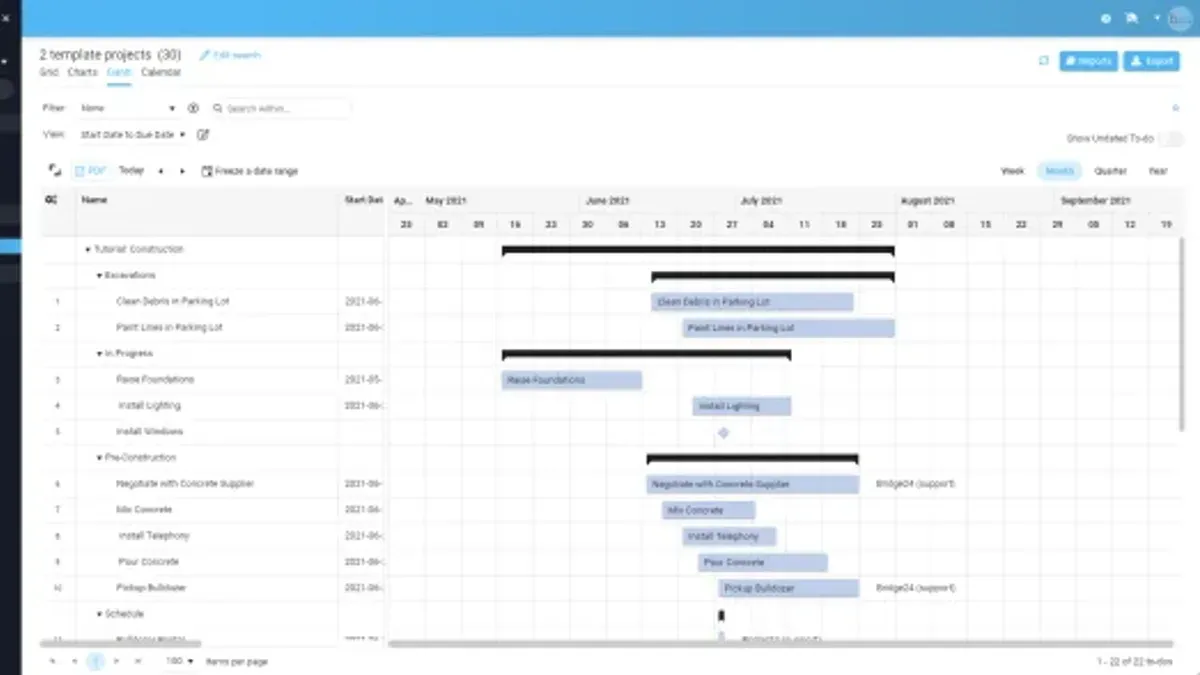
Basecamp’s Schedule tab offers a timeline view that resembles a Gantt chart but lacks critical project scheduling features. It does not support native task dependencies, meaning you must manually adjust all subsequent tasks if one task is delayed. There is no automatic rescheduling, so timeline accuracy depends entirely on your ongoing manual updates.
The platform also does not provide critical path analysis or resource workload views. Without these, you cannot easily identify which tasks directly impact your project deadline or balance workloads across your team. This limitation can obscure bottlenecks and resource conflicts that advanced project management tools typically highlight.
Each to-do item in Basecamp can have only one assignee. Tasks that require multiple people must be split into separate to-dos, which can complicate tracking and increase administrative overhead. This design restricts collaborative task ownership and granular workload distribution.
If your project demands advanced scheduling features like dependencies, baseline comparisons, or resource leveling, Basecamp alone will not suffice. Consider integrating or switching to specialized tools such as ONES.com for full Gantt chart capabilities and comprehensive timeline management.
For example, imagine a launch timeline where Task A must finish before Task B starts. In Basecamp, if Task A slips, you must manually push Task B’s start date forward. Without dependency enforcement, it’s easy for downstream tasks to be overlooked or mistimed, risking project delays.
Avoid Common Pitfalls That Can Derail Your Basecamp Implementation Timeline
One of the biggest mistakes is treating Basecamp like a filing cabinet or a digital sticky note wall. This habit scatters your projects, buries crucial communication, and pushes teams back to email, Slack, or spreadsheets within months. Imagine a project where tasks and updates are dumped randomly into Docs & Files or Chats; critical deadlines slip and accountability fades.
Overly permissive access permissions also undermine your timeline. When too many users receive broad access, signal-to-noise ratio plummets. Team members get overwhelmed by irrelevant notifications, leading to disengagement and missed updates.
To-do lists that balloon without clear priorities cause decision fatigue and missed deadlines. When tasks pile up unordered, you lose focus on what needs immediate action. Due dates alone won’t solve this if they aren’t tied to visible commitments like standups or automatic check-ins.
Another common failure is mixing task-related conversations between comments and chats. When discussions stray from to-do comments into chat threads, context scatters. This makes tracking decisions and progress harder and fragments accountability.
| Common Pitfall | Cause | Practical Fix |
|---|---|---|
| Treating Basecamp like a filing cabinet or sticky note wall | Unstructured dumping of files and messages | Enforce disciplined use of Docs & Files and Message Boards; avoid random uploads and chats |
| Overly permissive access permissions | Granting broad, unnecessary access to all users | Assign permissions carefully using administrator, team member, and client roles |
| Ballooning to-do lists without priorities | No task ordering or prioritization | Limit to-do list size and prioritize tasks visibly; link due dates to standups/check-ins |
| Mixing task-related conversations between comments and chats | Using chat for task discussions instead of comments | Keep all task conversations within to-do comments to preserve context |
Picture a team where every task’s due date syncs with a weekly standup agenda and all discussions stay in to-do comments. This keeps deadlines visible and conversation context intact. Avoid treating Basecamp as a dumping ground and assign permissions so users receive only relevant updates. These steps protect your timeline from common derailments and keep your project on track. Strategic Basecamp Setup
Follow the Essential Order of Operations for Setting Up Your Basecamp Timeline
Begin your Basecamp implementation by deciding your account structure and defining project names focused on clear outcomes, such as 'Q3 Marketing Campaign'. This foundation ensures centralized management or necessary data isolation. Next, establish Message Boards organized into categories aligned with your delivery structure, like Governance, Risk & Issues, and Scope Changes, to maintain communication clarity and accountability.
Before adding individual tasks, set up phase-based to-do lists within projects that represent distinct workflow stages—Planning, Execution, and Review. This phased approach provides a logical framework for task assignment and progress tracking. Only after these steps add tasks, assigning each to an individual with clear due dates; remember that each to-do can have only one assignee, so split tasks if multiple people are involved.
Populate the Schedule tab with tasks and key milestones to create a visual timeline. This step depends on properly assigned and dated tasks; skipping earlier steps leads to an incomplete or misleading timeline view because Basecamp's Schedule lacks dependency or progress shading features. Finally, configure automatic check-ins to prompt regular progress updates, maintaining momentum and transparency.
Reordering these steps disrupts clarity and accountability. For example, adding tasks before defining project phases causes confusion in tracking progress and assigning responsibility. Setting the schedule before tasks are assigned results in an empty or inaccurate timeline. Neglecting Message Boards early on dilutes communication focus, making risk and scope discussions harder to follow.
A concrete example: if you create tasks and schedule dates before establishing to-do lists for phases, your timeline will mix unrelated tasks, making it difficult to track phase completion. Conversely, following the sequence ensures your timeline reflects real progress tied to accountable individuals within organized project phases, supporting effective decision-making and delivery.
Reference the decision on account structure and project naming as the critical first step here.
Maintain Your Basecamp Projects After Initial Setup for Ongoing Success
Archiving completed projects is essential to keep your active dashboard focused and manageable. When a project is archived, it remains searchable, preserving your data without cluttering your workspace. This step should follow project completion promptly to prevent distractions from outdated tasks.
Automatic check-ins must be reviewed regularly, ideally on a weekly basis. These recurring status questions generate a written trail of progress and help you identify schedule slippage early. Ignoring check-in responses risks losing sight of delays that could compromise your timeline.
To-do lists tend to expand over time, which dilutes focus and complicates tracking. Periodically pruning these lists by removing obsolete or completed tasks ensures your team concentrates on current priorities. This practice maintains clarity and prevents task overload.
Maintaining discipline on message boards preserves clear communication channels. Consistent categorization and relevant posting avoid confusion and information scattering, which can impair decision-making and accountability.
For example, after a product launch concludes, archive that project to keep your dashboard clean. Meanwhile, review automatic check-in feedback weekly to catch any emerging issues. Trim your to-do lists monthly to keep them concise. Enforce message board rules continuously to sustain communication clarity. These actions collectively uphold the accuracy and usability of your Basecamp timeline over the long term.
Read next
- Plan and Execute an Effective Asana Rollout for Startup Teams
- Switching from Asana to Basecamp: Expert Steps and Insights
- Moving from Airtable to Basecamp Checklist: A Clear Expert Guide
- Master the Asana Implementation Timeline for Project Success
Frequently asked questions
What is the program basecamp?
It provides features like message boards, to-dos, file storage, and a Schedule tab that offers a timeline overview of project milestones.
How to use basecamp tutorial?
A Basecamp tutorial typically guides you through setting up your account structure, creating projects named for clear outcomes, organizing Message Boards into categories like Governance or Risk & Issues, assigning tasks with one assignee each, and using the Schedule tab for timeline views. Focus on learning the order of operations for setup to avoid common pitfalls.
How to use basecamp for project management?
Use Basecamp by structuring projects around deliverables and phased workflows, setting up Message Boards to support strategic communication, and tracking tasks with to-dos assigned to individuals. Employ the Schedule tab for a timeline view, but plan around its lack of dependencies and progress shading. Maintain projects regularly to ensure ongoing success.
How does basecamp work?
Tasks must be assigned to one person, and communication is organized in categorized Message Boards aligned with your delivery structure. Permission levels control access, differentiating administrators, team members, and clients.
How to use basecamp?
Start by deciding your account structure based on your project delivery model, then name and organize projects with clear outcome focus. Set up Message Boards by categories like Scope Changes or Risk & Issues, assign tasks carefully since each to-do only allows one assignee, and use the Schedule tab to track timelines while understanding its feature limits.
Is basecamp a project management tool?
It supports different permission levels and organizes work through projects and structured Message Boards, making it suitable for coordinating project delivery.
Final Steps to Confirm Your Basecamp Implementation
If you manage numerous small, independent projects, multiple accounts may provide clearer separation and control. For integrated or phased workflows under one umbrella, a single account with well-named projects and organized message boards supports streamlined communication and accountability. Always match permission levels to team roles to maintain security and efficiency.
References
- Basecamp
- How to Set Up Basecamp for Strategic – Project Management Formula — Project Management Formula
- What Is a Gantt Chart in Basecamp and How Do You Use It? — ONES.com Blog
- Client Onboarding project management example — Basecamp
- Organizing Tasks in Basecamp: A Step-by-Step Workflow — ONES.com Blog